Deck options primarily control the way Anki schedules cards. It is recommended
that you spend a few weeks with the defaults to get a feel for how Anki works
before you start adjusting the options. Make sure you understand the options
before changing them, as mistakes can reduce Anki’s effectiveness.On your computer, do any of the following to open deck options:
Click the gear icon on the Decks screen.
Select a deck on the Decks screen, and then click Options
at the bottom of the screen.
Click More > Options while in review mode.
Press O while in review mode.
Here are some community posts about deck options that have been contributed in the past:
Anki allows you to share options between different decks, to make
it easier to update options in many decks at once. To do this, options are
grouped into presets. If you change an option in a preset, the change is applied to all decks that use the same preset. All newly created decks use the “Default” preset.To change the options in one deck but not other decks, click the
arrow icon in the top right of the Deck Options window. You can do the following:
Save: Save all modifications you’ve made in deck options.
Add Preset: Add a new preset for this deck, with the default options.
Clone: Clone your current preset, which is useful if you
want to modify some of the options but keep the rest as they are.
Rename: Change the name of the current preset.
Delete: Delete the current preset. This will make your next sync
a one-way sync.
Save to All Subdecks: Like Save, but also assigns the selected preset to all
subdecks of the currently selected deck.
Deck options are not retroactive. For example, if you change an option that
controls the delay after failing a card, cards that you failed before
changing this option will still have the old delay, not the new one.
If your deck has subdecks, and you wish one or more of them to have different settings from the parent deck, you can assign those subdecks to separate presets.
When Anki shows a card, it will check which subdeck the card is in, and use the options
for that deck. There are two exceptions:
The New cards/day and Maximum reviews/daylimits of a subdeck affect the number of cards that can be gathered from that subdeck. But the total number of cards you see during your study session is controlled by the limits of the deck you select to study.
The display order options are taken from the
deck you select to study, not the deck of the current card.
For example, let’s say you have this collection:
    - Deck A (Preset 1)
      - Deck A::Subdeck B (Preset 2)
Preset 1 and Preset 2 are identical, with two exceptions:
Preset 1:
Learning steps: 1m 10m
New/review order: Mix with reviews
Preset 2:
Learning steps: 20m 2h
New/review order: Show after reviews
If you choose to study Subdeck B:
Learning steps for all new cards will be 20m 2h (Preset 2 applies).
All new cards will be shown after reviews (Preset 2 applies).
If you choose to study Deck A:
Learning steps for new cards in Deck A will be 1m 10m (Preset 1 applies).
Learning steps for new cards in Subdeck B will be 20m 2h (Preset 2 applies).
All new cards will be mixed with reviews (Preset 1 applies).
This option controls how many new cards can be introduced each day you open the program. If you
study fewer than the limit, or miss a day, the next day the counts will be back
to their original setting: you won’t be given more cards than your limit allows.When studying a deck that has subdecks inside it, the limits set on each subdeck control the maximum number of cards drawn from that particular deck. The selected deck’s limits control the total number of cards that will be shown.For earlier versions, see this FAQ page.Studying new cards will temporarily increase the number of reviews you need to
do a day, as newly-learned material needs to be repeated a number of times
before the delay between repetitions can increase appreciably. If you are
consistently learning 20 new cards a day, you can expect your daily reviews to
be roughly about 200 cards/day. You can decrease the reviews required by
introducing fewer new cards each day until your review burden decreases. More than one Anki user has excitedly studied
hundreds of new cards over their first few days of using the program, and then has
become overwhelmed by the reviews required.
Allows you to set an upper limit on the number of review cards to show each day.
When this limit is reached, Anki will not show any more review cards for the
day, even if there are more waiting. If you study consistently, this setting can
help to smooth out occasional peaks in due card counts, and can save you from a
heart attack when returning to Anki after taking a week off. When reviews have been
hidden due to this option, a message will appear in the congratulations screen,
suggesting you consider increasing the limit if you have time.When studying a deck that has subdecks inside it, the review limit behaves similarly to the new card limit.Anki includes any learning cards that have crossed the day boundary (interday learning cards) in the review count,
so those learning cards will be subject to the review limit.
It is possible to use the same preset for different decks, with customized limits for each of them. This eliminates the need to create cloned presets just for that purpose, and makes it easier to set custom limits on subdecks.Anki provides three options for daily limits:
Preset: applies to all the decks using a preset.
This deck: specific to a particular deck.
Today only: specific to a particular deck, and temporary.
By default, the review limit also applies to new cards, and no new cards will be shown when the review limit has been reached. If this option is enabled, new cards will be shown regardless of the review limit.If you have a backlog of overdue review cards, it is recommended that you stop introducing new cards until you
catch up with that backlog. Continuing to introduce new cards when you’re already behind can
make the backlog worse.
By default, the daily limits of a higher-level deck do not apply if you select one of its subdecks. A parent deck can have a new card limit of 10 cards/day and its subdecks can have a new card limit of 20 cards/day. The limits set on the parent deck do not affect the number of new cards you can study from its subdeck.When this option is enabled, the limits set on higher-level decks also apply to their subdecks when a subdeck is selected. In the previous example, you will be able to study only 10 new cards from the subdecks instead of 20 new cards.This option can be useful if you wish to study individual subdecks, while enforcing a total limit on cards in all the subdecks.
The options here only affect new cards and
learning cards. Once a card
has graduated (that is, gone through all the learning steps), the options in this section no longer apply to the card.
Controls the number of learning repetitions, and the delay
between them. One or more delays, separated by spaces must be entered.
Each time you click Good during review, the card moves to the next step. Each time you click Again, the card goes back to the first step.For example, let’s say that your learning steps are 1m 10m 1d.
When you click Again, the card goes through the first step, and is shown
again 1 minute later.
When you click Good on a new card or after the 1 minute step, it moves
to the next step, and is shown again in 10 minutes.
When you click Good on a card after the 10 minute step, it is delayed
until the next day.
When you click Good on the card the next day, it graduates and
becomes a review card. The card is shown again after the delay configured by the
graduating interval.
The Hard button works differently depending on which step you’re on.
When you’re on the first step, the Hard button shows a delay of 6m. The 6m delay is the average of first two steps: 1m and 10m.
Exception: When there’s only one learning step, the Hard button shows a delay 1.5 times that step. This delay is at most 1 day longer than the learning step.
When you’re on any other step, the Hard button repeats that step.
If there’s nothing else to study, Anki will show learning cards up to 20 minutes
early by default. To turn this off or change the amount of time to look ahead, see Preferences.
Anki treats small steps and steps that cross a day boundary differently.
With small steps, the cards are shown as soon as the delay has passed,
in preference to review cards and new cards. This is done so that
you can answer the card as closely to your requested delay as possible.
In contrast, if the step crosses a day boundary, the delay is automatically converted to days. For example, if the next day starts after 5 hours and the delay is 6 hours, Anki converts the delay to 1 day.
The number of days to wait before showing a card again, after the Good button is used on the final learning step. This means that it is the first interval
after the learning card graduates. See the example
from earlier in this section.
The number of days to wait before showing a card again, after the Easy button is used on it.The Easy button turns learning cards into a review cards regardless of which step you’re on,
and assigns them the delay you have configured in this option. Easy interval should always be at least
as long as the graduating interval, and typically a few days longer.
Controls whether Anki should add new cards into the deck randomly, or sequentially.
When you change this option, Anki will re-sort the decks in the current preset.On recent Anki versions, you should leave this option set to Sequential, and adjust the display order instead.
The same as learning steps, but for lapsed cards. When you fail a review card
(press Again), the card goes through relearning steps, before it becomes a review card again.If you leave the steps blank, the card will skip relearning, and will be assigned
a new interval of 1 day by default.
Specifies a minimum number of days a card should wait after it finishes relearning.
The default is one day, meaning once relearning is finished, it will be shown again
the next day.
The options in this section are taken from the deck you select to study, not
the deck of the currently displayed card.Some further information about display order is available in the studying section.
Controls how Anki gathers new cards from a deck. The options are:
Deck: Gathers cards from each subdeck in order, starting from the top. Cards from
each subdeck are gathered in ascending position. If the daily limit of the selected
deck is reached, gathering may stop before all subdecks have been checked. This
order is fastest in large collections, and allows you to prioritize subdecks that
are closer to the top.Decks/subdecks are always ordered alphabetically, so you can give them a numeric prefix like
001 to control the order they appear in. You can also use _ and ~ as a
prefix to place items at the top or bottom.Although position order depends initially on the insertion order option, you can manually
reposition cards in different
ways.
Deck, then random notes: Gathers cards from each subdeck in order, starting from the top.
Cards from each subdeck are gathered from randomly selected notes.
Ascending position: Gathers cards by ascending position (due #), which is typically the oldest-added first.
Descending position: Gathers cards by descending position (due #), which is typically the latest-added first.
Random notes: Gathers cards from randomly selected notes.
Controls how the new cards are sorted after they have been gathered. The options are:
Card type, then order gathered: Shows cards in order of card type number. Cards of each card type number are shown in the order they were gathered. If you have sibling burying disabled, this ensures all front→back cards are seen before any back→front cards.
This order is useful if you don’t want sibling cards to appear too close to each other.
Order gathered: Shows cards exactly as they were gathered. If sibling burying is disabled, this typically results in all sibling cards appearing one after the other.
Card type, then random: Shows cards in order of card type number, but shuffles the cards of each card type number.
This order is useful if you don’t want sibling cards to appear too close to each other, but still want the cards to appear in a random order.
Random note, then card type: Picks notes at random, then shows all of their siblings in order.
Whether (re)learning cards that cross a day boundary should be mixed in with review cards,
shown before them, or shown after them. Because learning cards tend to be harder than
review cards, some users prefer to see them at the end (getting the easy stuff done
first), or at the start (allowing more time to review forgotten ones).
Controls how the review cards are sorted. The options are:
Due date, then random: The default order prioritizes cards that have been waiting
longer, and it’s the recommended order when you are up to date, or when you only have a small
backlog. If you have taken an extended break or have fallen behind in your reviews,
you may want to consider changing the sort order temporarily.
Due date, then deck: This also prioritizes cards that have been waiting
longer, and then shows review cards for each subdeck in turn.
Deck, then due date: Shows review cards for each
subdeck in turn. This order is generally not recommended, as having material appear
consistently in the same order makes it easier to guess the answer based on context,
and leads to weaker memories.
Ascending intervals: Shows cards with shorter intervals first.
Descending intervals: Shows cards with longer intervals first.
Ascending ease: Shows more difficult cards first.
Descending ease: Shows less difficult cards first.
Relative overdueness: Shows cards that you’re more likely to have forgotten first. This is generally recommended if
you have a large backlog that may take some time to get through, and you want to
reduce the chances of forgetting more cards.When using the SM-2 algorithm, overdueness is determined by comparing how
overdue cards are, and how long their interval is. For example, a card with a
current interval of 5 days that is overdue by 2 days, will display before a card
with a current interval of 10 days that is overdue by 3 days.When FSRS is enabled, this sort order is removed; the FSRS equivalent is Ascending retrievability,
which is calculated based on each card’s retrievability (probability of recall) and the desired retention in the preset.
When Anki gathers cards, it first gathers intraday learning cards, then interday learning cards, then review cards, and finally new cards. This affects how burying works:
If you have all burying options enabled, the sibling that comes earliest in that list will be shown. For example, a review card will be shown in preference to a new card.
Siblings later in the list can not bury earlier card types. For example, if you disable burying of new cards, and study a new card, it will not bury any interday learning or review cards, and you may see both a review sibling and new sibling in the same session.
The options are:
Bury new siblings: Whether other new cards of the same note (e.g. reverse cards, adjacent cloze deletions) will be delayed until the next day.
Bury review siblings: Whether other review cards of the same note will be delayed until the next day.
Bury interday learning siblings: Whether other learning cards of the same note that crossed a day boundary will be delayed until the next day.
For more info about burying cards, see this section of the manual.
Don’t play audio automatically: By default, Anki automatically plays any audio you have on
cards. If you turn on this option Anki will not play audio until you press the replay audio key, R or F5.
Skip question when replaying answer: Controls whether audio from
the question side is played when you use replay action on the answer side. Note that, Anki does not automatically play audio from the {{FrontSide}} field. This option does not influence the behaviour of automatic play.
Anki monitors how long it takes you to answer each card, so that it
can show you how long was spent studying each day. The time taken does
not influence scheduling.
Maximum answer seconds: The default limit is 60 seconds. If you take
longer than that, Anki assumes you have walked away from your computer
or have been distracted, and caps the recorded time at 60 seconds, so
that you don’t end up with inaccurate statistics.
This internal timer runs from when the question is shown until you press a button to grade your answer. If you consistently
spend longer than 60 seconds on a card,
you may want to consider either raising
this limit, or even better, making your cards simpler.
Show on-screen timer: On the Study screen, show a timer that counts the time
you’re taking to study each card. (This timer will stop when it reaches the Maximum answer seconds set for the internal timer.)
Stop on-screen timer on answer: Whether the on-screen timer should continue running from when you show
the answer until you press a button to grade your answer. This option does not impact the time that is recorded for your statistics.
Requires Anki 23.12 or later. Auto Advance allows you to automatically take some actions after a certain amount of time has passed. To use it, you must first set a non-zero
time in Seconds to show question for and/or Seconds to show answer for. Then, in the
study screen, use the Auto Advance action from the More button to start advancing.
If you want to spend less time on Anki on some days of the week, such as Sundays, this feature can help you do that.
After the interval is calculated, it will be adjusted by a small amount to change the due date.
Note that setting all days to “Reduced” or “Minimum” will result in the same workload as setting all days to “Normal”.
This feature works with both FSRS and the legacy SM-2 algorithm.
Changing your Easy Days configuration doesn’t retroactively change existing intervals and will only affect future intervals. Simply put, you will not see immediate changes in the number of due cards.
The Free Spaced Repetition Scheduler (FSRS) is an alternative to Anki’s legacy
SuperMemo 2 (SM-2) algorithm. By more accurately determining how much information you are likely
to forget, it can help you remember more material in the same amount of time.When you turn on FSRS, some new options
become available, and SM-2 specific options, such as Graduating interval,
Easy bonus, etc. are hidden. This option is shared by all presets.Before Enabling
Ensure all of your Anki clients support FSRS. Anki 23.10, AnkiMobile 23.10,
and AnkiWeb all support it. AnkiDroid supports it in 2.17+. If
one of your clients doesn’t support it, things will not work correctly.
If you previously used the “custom scheduling” version of FSRS, make
sure you clear out the custom scheduling section before enabling FSRS.
Enable FSRS under the “FSRS” section, at the bottom of the deck options page. FSRS can only be enabled globally; you cannot enable it for some presets and disable it for others.
Ensure that all your learning and re-learning steps are shorter than 1d and can be completed on the same day. 23h is not recommended even though it’s less than one day because you won’t be able to finish this step on the same day as your first review. Steps such as 10m or 30m are good.
Click the “Optimize” button under the “FSRS parameters” field. If you see a message that says “The FSRS parameters currently appear to be optimal”, that’s fine.
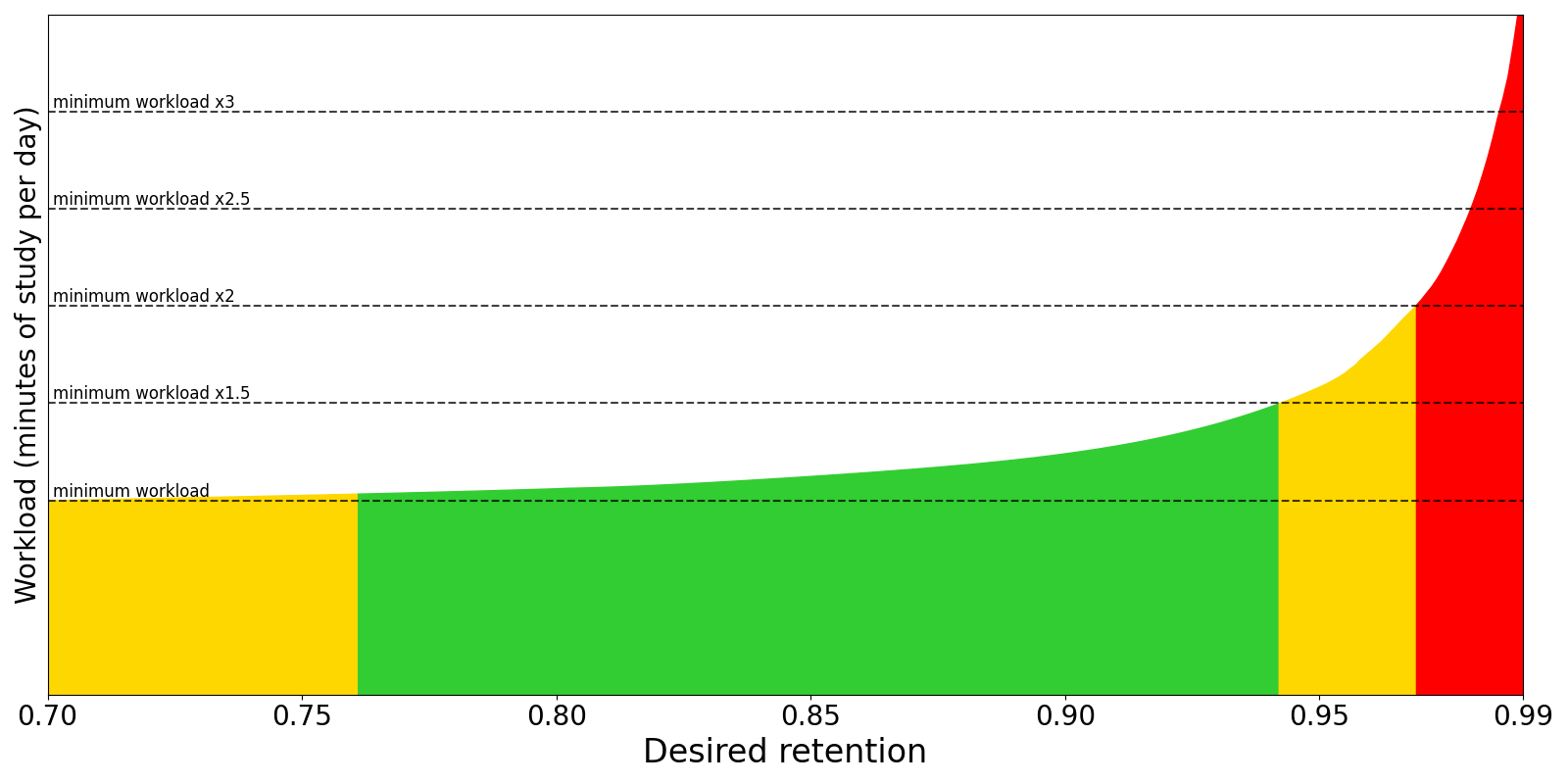
Choose a value of desired retention: the proportion of cards recalled successfully when they are due. This is the most important setting in FSRS. Higher retention leads to shorter intervals and more reviews per day. The default is 90%, which offers a good balance of retention and workload. Above 90% the workload increases very quickly, and above 97% the workload can be overwhelming. You can use “Compute minimum recommended retention” to help you choose the value of desired retention.
Parameters and desired retention are preset-specific, so you can create multiple presets with different settings.FSRS can adapt to almost any habit, except for one: pressing “Hard” instead of “Again” when you forget the information. When you press “Hard”, FSRS assumes you have recalled the information correctly (though with hesitation and a lot of mental effort). If you press “Hard” when you have failed to recall the information, all intervals will be unreasonably high. So, if you have this habit, please change it and use “Again” when you forget the information.Regarding add-on compatibility, as a general rule of thumb, if an add-on affects intervals and scheduling in some way, it shouldn’t be used with FSRS.
Desired retention controls how likely you are to remember cards when they are scheduled for a review.
The default value of 90% will schedule cards so you have a 90% chance of
remembering them when they come up for review again. This should normally
translate to remembering around 90% cards when they are reviewed, and only
failing around 10%.Here is a graph that shows how adjusting desired retention will affect your
workload:The exact shape of the graph is different for everyone. However, the overall
shape is more or less the same. In general, at lower desired retention you will
have to do significantly fewer reviews per day, but you will also forget more
cards. As desired retention approaches 100%, the workload increases drastically.
For this reason, we suggest you be conservative when adjusting this number,
and recommend you keep it lower than 97%.In the latest version of Anki, you can set different values of desired retention
for different decks within the same preset.
Help Me Decide (Experimental) allows you to simulate workload at different
levels of retention. In other words, you can find out what your own,
personalized retention-workload graph looks like. This can help you choose what
value of desired retention is the best for your needs.If you are unsure what to do with this information, you can ask yourself “How
many reviews can I realistically do per day?” or “How many minutes can I
realistically spend on reviews per day?”, and check the corresponding workload
graph to see what value of desired retention gives you a tolerable workload.Alternatively, you can check the amount of reviews/day (or time/day) at your
current desired retention, then check how it will change if you change desired
retention, and ask yourself “Do I want to study this much more to remember this
much more?” or “Do I want to study this much less if it means remembering this
much less?”.For more information about the simulator, please read
this section.
FSRS parameters affect how cards are scheduled. Do not change the parameters manually or copy them from someone else.Optimize FSRS ParametersThe FSRS optimizer uses machine learning to learn your memory patterns and
find parameters that best fit your review history.
To do this, the optimizer requires several reviews to fine-tune the parameters.When you click the Optimize button, FSRS will analyze your review history,
and generate parameters that are optimal for your memory and the content you’re
studying. If you have decks that vary wildly in subjective difficulty, it
is recommended to assign them separate presets, as the parameters for easier
decks will be different from harder decks. There is no need to optimize your
parameters frequently: once every month is sufficient.By default, parameters are calculated from the review history of all
decks using the current preset. You can optionally adjust the search
before optimizing the parameters, if you’d like to change which cards
are used for optimization.You can also optimize the parameters for all of your presets at once by clicking on Optimize All Presets.Health CheckYou can enable Check health when optimizing (slow) to check how well FSRS
can adapt to your review history. Some common reasons why FSRS may not perform
well:
Low number of reviews (less than a few hundred). As a machine learning
algorithm, FSRS needs data to learn from.
Hard misuse. Hard
should not be used when you forgot the answer; it is a passing grade, not a
failing grade.
Not using Again when you forgot the answer. Anki assumes that if you forgo
the answer, you will press Again, and if you recalled it, you will press
Hard/Good/Easy.
This option controls whether the due dates of cards will be changed when you
enable FSRS, change desired retention, or change the parameters. The default is
not to reschedule cards: future reviews will use the new scheduling, but there
will be no immediate change to your workload. If rescheduling is enabled, the
due dates of cards will be changed. Depending on your desired retention, it will
often result in a large number of cards becoming due, so this option is not
recommended when first switching from SM-2.Use this option sparingly, as it will add a review entry to each of your cards, and increase the size of your collection.If you’re first switching from SM-2 and still wish to use this option, we
recommend you first create a backup, enable FSRS with rescheduling, and then if
needed, you can undo or restore from the backup.
Removed FeatureThis feature has been removed as of anki version 25.07
Compute minimum recommended retention (CMRR) attempts to find the desired retention value that leads to the most material learned, in the least amount of time. The calculated number can serve as a reference when deciding what to set your desired retention to. You may wish to choose a higher desired retention, if you’re willing to trade more study time for a greater retention rate. However, setting your desired retention lower than the minimum is not recommended, as you’ll spend more time studying than necessary, due to increased forgetting.
You can use the simulator to get an estimate of your workload,
either in reviews per day or in minutes of studying per day.
Days to simulate controls the duration of the simulated study history.
Additional new cards to simulate controls whether the simulator should
simulate more cards than this preset already has. For example, if you currently have 100 cards under this preset,
and you set Additional new cards to simulate to 50, the simulator will simulate a total of 150 cards.
This can be useful if you plan to create more new cards in the future.
New cards/day and Maximum reviews/day control how many new cards will be learned each day and
the maximum number of reviews per day.
Maximum interval controls the maximum interval length (in days).
To make the simulation as realistic as possible, the simulator takes into account the real memory states (difficulty, stability, retrievability) of your cards.
It also uses your FSRS parameters and the value of desired retention, therefore changing them will affect the simulation.
(Re)learning steps of 1 day or greater are not recommended when using FSRS. The main
reason they were popular with the legacy SM-2 algorithm is because repeatedly
failing a card after it has graduated from the learning phase could reduce
its ease a lot, leading to what some people called “ease hell”. This is not
a problem that FSRS suffers from. By keeping your learning steps under a
day, you will allow FSRS to schedule cards at times it has calculated are
optimal for your material and memory. Another reason not to use longer
learning steps is because FSRS may end up scheduling the first review for a
shorter time than your last learning step, leading to the Hard button
showing a longer time than Good.We also recommend you keep the number of learning steps to a minimum. Evidence
shows that repeating a card multiple times in a single day does not significantly
contribute to long-term memory, so your time is
better spent on other cards or a shorter study session.In the latest version of Anki you can let FSRS control short-term scheduling by leaving the (re)learning steps field empty. This is an experimental feature.
Note that just because FSRS-5 can give you intervals shorter than one day doesn’t necessarily mean that it will. Your Again interval can be one day long, or even longer.
Some add-ons can cause conflicts with FSRS. As a general rule of thumb,
if an add-on affects a card’s intervals, it shouldn’t be used with FSRS.
A list of commonly used add-ons and their FSRS compatibility can be found in Add-on Compatibility.
The maximum number of days a review card will wait before it’s shown again. When reviews have reached the limit, Hard, Good and Easy will all give the same delay. The shorter you set this, the greater your workload will be. The default is 100 years; you can decrease this to a smaller number if you’re willing to trade extra study time for higher retention.
This setting is hidden unless FSRS is turned on.When some of your review history is missing, FSRS needs to fill in the gaps. By default, it will assume that when you did those old reviews, you remembered 90% of the material. If your old retention was appreciably higher or lower than 90%, adjusting this option will allow FSRS to better approximate the missing reviews.Your review history may be incomplete for two reasons:
Because you’re using the Ignore cards reviewed before option.
Because you previously deleted review logs to free up space, or imported material from a different SRS program.
The latter is quite rare, so unless you’re using the former option, you probably don’t need to adjust this setting.
If set, cards reviewed before the provided date will be ignored when optimizing FSRS parameters. This can be useful if you imported someone else’s scheduling data, or have changed the way you use the answer buttons.
Controls the ease that cards start out with. It is
set when a card graduates from learning for the first time. It defaults
to 2.50, meaning that once you have finished learning a card, answering
Good on subsequent reviews will increase the delay by approximately
2.5x (e.g. if the last delay was 10 days, the next delay would be around 25
days). Based upon how you rate the card in subsequent reviews, the
ease may increase or decrease from its starting value.
An extra multiplier applied to the interval when a review card is answered
Easy. With the default value of 1.30, Easy will give an interval that is
1.3 times the Good interval (e.g. if the Good interval was 10 days, the Easy
interval would be around 13 days).
An extra multiplier that is applied to all reviews. At its default of 1.00 it
does nothing. If you set it to 0.80, intervals will be generated at
80% of their normal size (so a 10 day interval would become 8 days).
You can thus use the multiplier to make your reviews less or more frequent.For moderately difficult material, the average user should find they
remember approximately 90% of mature cards when they come up for review. You
can find out your own performance by opening the graphs/statistics for a
deck and looking at the Answer Buttons graph - mature retention is the
correct% on the right side of the graph. If you haven’t been studying for
long, you may not have any mature cards yet. As performance with new
cards and younger cards can vary considerably, it’s a good idea to wait
until you have a reasonable amount of mature reviews before you start
drawing conclusions about your retention rate.On the SuperMemo website, they suggest that you can find an appropriate
multiplier for a desired retention rate. Their formula boils down to:
log(desired retention%) / log(current retention%)
Imagine we have a current retention rate of 85% and we want to increase
it to 90%. We’d calculate the modifier as:
log(90%) / log(85%) = 0.65
You can use any search engine to calculate this.If you enter the resulting 65% into the interval modifier, you should
find over time that your retention moves closer to your desired
retention.One important thing to note however is that the trade-off between time
spent studying and retention is not linear: we can see here that to
increase our retention by 5 percentage points, we would have to study 35%
more frequently. If the material you are learning is very important then
it may be worth the extra effort – that is, of course, something you will need to
decide for yourself. If you are simply worried that you are forgetting too
much, then you may find investing more time at the initial learning stage, or using mnemonics will give you more gain for less effort.One final thing to note is that Anki forces a new interval to be at
least 1 day longer than it was previously, so that you do not get stuck
reviewing with the same interval forever. If your goal is to repeat a
card once a day for multiple days, you can do that by setting more
learning mode steps, instead of by adjusting this modifier.
The multiplier applied when you use the Hard button. The percentage is relative
to the previous interval, e.g. with a default of 1.20, a card with a 10-day interval
will be given 12 days.
The multiplier applied when you use the Again button on a review card. The
default 0.00 means that a review card’s delay is reset to zero when you forget it
(which then becomes 1 day after the minimum interval is
applied).If changed from the default, it is possible for forgotten cards to preserve part
of their previous delay. For example, if a card had a 100 day interval, and you set
the New Interval to 0.20, the new interval would be 20 days.While preserving part of the interval may seem to make sense, SuperMemo has observed
that preserving part of the delay can actually be counter-productive. For this reason, we recommend you leave it on the default setting.
You can have more control over Anki’s scheduling of cards by using your own JavaScript in the custom scheduling field. This is a global option, so code entered here applies to every preset.Here is an example custom scheduling script. Note that, for Qt5 versions of Anki, the code needs to be transpiled.
// print the existing statesconsole.log(JSON.stringify(states, null, 4));// load the debugger if the web inspector is opendebugger;// if the hard button is a learning step, make it// a 123 minute delayif (states.hard.normal?.learning) { states.hard.normal.learning.scheduledSecs = 123 * 60;}// apply the same change in a rescheduling filtered deckif (states.hard.filtered?.rescheduling?.originalState?.learning) { states.hard.filtered.rescheduling.originalState.learning.scheduledSecs = 123 * 60;}// increase ease factor by 0.2 when Easy used on a reviewif (states.good.normal?.review) { states.easy.normal.review.easeFactor = states.good.normal.review.easeFactor + 0.2;}
{"docsConfig":{"theme":"mint","$schema":"https://mintlify.com/docs.json","name":"Anki Docs","colors":{"primary":"#4B94D8","light":"#6BADE8","dark":"#2F75B5"},"logo":{"light":"https://mintcdn.com/anki/4yLyWj6_UVW-sSDI/media/anki-logo.svg?fit=max\u0026auto=format\u0026n=4yLyWj6_UVW-sSDI\u0026q=85\u0026s=6d1dc6938946ebdf46b57afa43c45a91","dark":"https://mintcdn.com/anki/4yLyWj6_UVW-sSDI/media/anki-logo.svg?fit=max\u0026auto=format\u0026n=4yLyWj6_UVW-sSDI\u0026q=85\u0026s=6d1dc6938946ebdf46b57afa43c45a91"},"favicon":"https://mintcdn.com/anki/4yLyWj6_UVW-sSDI/media/anki-logo.svg?fit=max\u0026auto=format\u0026n=4yLyWj6_UVW-sSDI\u0026q=85\u0026s=6d1dc6938946ebdf46b57afa43c45a91","fonts":{"family":"Hanken Grotesk"},"styling":{"latex":true},"navigation":{"global":{"anchors":[{"anchor":"Anki","icon":"house","href":"https://apps.ankiweb.net"},{"anchor":"GitHub","icon":"github","href":"https://github.com/ankitects/anki"}]},"languages":[{"language":"en","href":"manual/intro"},{"language":"de","href":"de/manual/intro"},{"language":"es","href":"es/manual/intro"},{"language":"fr","href":"fr/manual/intro"},{"language":"it","href":"it/manual/intro"},{"language":"id","href":"id/manual/intro"},{"language":"uz","href":"uz/manual/intro"},{"language":"pl","href":"pl/manual/intro"},{"language":"pt","href":"pt/manual/intro"},{"language":"ru","href":"ru/manual/intro"},{"language":"uk","href":"uk/manual/intro"},{"language":"ar","href":"ar/manual/intro"},{"language":"ja","href":"ja/manual/intro"},{"language":"zh-Hans","href":"zh-Hans/manual/intro"}]}},"deployment":{"deploymentMetadataValue":{"subdomain":"anki","hasAudioNarration":false,"actualSubdomain":"anki","customDomains":["docs.ankiweb.net"],"gitSource":{"type":"github","owner":"ankitects","repo":"anki","deployBranch":"mintlify-docs","contentDirectory":"docs-site","isPrivate":false,"mountPath":"","label":""},"chroma":{"liveDeploymentHistoryId":"6ac930d1632132e2b6a568cb","collectionId":"30b5459a-0716-4d3a-9bce-0510691b2172","schemaVersion":"v3","latestBuiltDeploymentHistoryId":"6ac930d1632132e2b6a568cb"},"feedback":{"thumbs":true},"entitlements":{"AI_CHAT":{"status":"DISABLED"}},"buildId":"6ac930d1632132e2b6a568cb","clientVersion":"0.0.3894","searchFilterCounts":[{"language":"en","tag":"FAQs","count":72},{"language":"en","tag":"Support FAQs","count":72},{"language":"ar","tag":"FAQs","count":65},{"language":"ar","tag":"Support FAQs","count":65},{"language":"en","tag":"Manual","count":55},{"language":"en","tag":"Desktop Manual","count":55},{"language":"ar","tag":"Manual","count":47},{"language":"ar","tag":"Desktop Manual","count":47},{"language":"en","tag":"Releases","count":34},{"language":"en","tag":"Release Notes","count":34},{"language":"en","tag":"Add-ons","count":21},{"language":"en","tag":"Add-on Development","count":21},{"language":"en","tag":"Developers","count":21},{"language":"en","tag":"Core Development","count":21},{"language":"ar","tag":"Platform Notes","count":18},{"language":"ar","tag":"Cards and Notes","count":16},{"language":"ar","tag":"Scheduling","count":11},{"language":"ar","tag":"Synchronising and Ankiweb","count":11},{"language":"ar","tag":"Decks","count":8},{"language":"ar","tag":"Anki Desktop","count":8},{"language":"de","tag":"Manual","count":1},{"language":"de","tag":"Desktop Manual","count":1},{"language":"es","tag":"Manual","count":1},{"language":"es","tag":"Desktop Manual","count":1},{"language":"fr","tag":"Manual","count":1},{"language":"fr","tag":"Desktop Manual","count":1},{"language":"id","tag":"Manual","count":1},{"language":"id","tag":"Desktop Manual","count":1},{"language":"it","tag":"Manual","count":1},{"language":"it","tag":"Desktop Manual","count":1},{"language":"ja","tag":"Manual","count":1},{"language":"ja","tag":"Desktop Manual","count":1},{"language":"pl","tag":"Manual","count":1},{"language":"pl","tag":"Desktop Manual","count":1},{"language":"pt","tag":"Manual","count":1},{"language":"pt","tag":"Desktop Manual","count":1},{"language":"ru","tag":"Manual","count":1},{"language":"ru","tag":"Desktop Manual","count":1},{"language":"uk","tag":"Manual","count":1},{"language":"uk","tag":"Desktop Manual","count":1},{"language":"uz","tag":"Manual","count":1},{"language":"uz","tag":"Desktop Manual","count":1},{"language":"zh-Hans","tag":"Manual","count":1},{"language":"zh-Hans","tag":"Desktop Manual","count":1}]},"assistantConfig":{"enableAskAiButton":false,"enableStarterQuestions":false,"enableContextualStarterQuestions":false,"enableAskAiSearchBar":true},"hasChatPermissions":false,"hasWebMcpPermissions":false,"toggles":[{"name":"kill-isr","enabled":true,"variant":{"name":"disabled","enabled":false,"feature_enabled":true},"impressionData":false},{"name":"agent-mintlify-slack","enabled":true,"variant":{"name":"disabled","enabled":false,"feature_enabled":true},"impressionData":false},{"name":"editor-v7-file-tree","enabled":true,"variant":{"name":"disabled","enabled":false,"feature_enabled":true},"impressionData":false},{"name":"agent-integrations-settings","enabled":true,"variant":{"name":"disabled","enabled":false,"feature_enabled":true},"impressionData":false},{"name":"automations-pr-grouping","enabled":true,"variant":{"name":"disabled","enabled":false,"feature_enabled":true},"impressionData":false},{"name":"custom-prefix","enabled":true,"variant":{"name":"disabled","enabled":false,"feature_enabled":true},"impressionData":false},{"name":"analytics-v7","enabled":true,"variant":{"name":"disabled","enabled":false,"feature_enabled":true},"impressionData":false},{"name":"user-flows-analytics","enabled":true,"variant":{"name":"disabled","enabled":false,"feature_enabled":true},"impressionData":false},{"name":"no-publish-flow","enabled":true,"variant":{"name":"disabled","enabled":false,"feature_enabled":true},"impressionData":false},{"name":"workos-onboarding","enabled":true,"variant":{"name":"disabled","enabled":false,"feature_enabled":true},"impressionData":false},{"name":"llms-txt-v2","enabled":true,"variant":{"name":"disabled","enabled":false,"feature_enabled":true},"impressionData":false},{"name":"pause-universal-search-reconcile","enabled":true,"variant":{"name":"disabled","enabled":false,"feature_enabled":true},"impressionData":false},{"name":"snapshot-serving-live","enabled":true,"variant":{"name":"disabled","enabled":false,"feature_enabled":true},"impressionData":false},{"name":"stripTemperatureMiddleware","enabled":true,"variant":{"name":"disabled","enabled":false,"feature_enabled":true},"impressionData":false},{"name":"per-site-search-delta","enabled":true,"variant":{"name":"disabled","enabled":false,"feature_enabled":true},"impressionData":false},{"name":"support-platform-pylon-zendesk","enabled":true,"variant":{"name":"disabled","enabled":false,"feature_enabled":true},"impressionData":false},{"name":"editor-branches-v2-autocommit","enabled":true,"variant":{"name":"disabled","enabled":false,"feature_enabled":true},"impressionData":false},{"name":"editor-branches-v2","enabled":true,"variant":{"name":"disabled","enabled":false,"feature_enabled":true},"impressionData":false},{"name":"snapshot-serving","enabled":true,"variant":{"name":"disabled","enabled":false,"feature_enabled":true},"impressionData":false},{"name":"instant-rollback","enabled":true,"variant":{"name":"disabled","enabled":false,"feature_enabled":true},"impressionData":false},{"name":"granular-notifications-server","enabled":true,"variant":{"name":"disabled","enabled":false,"feature_enabled":true},"impressionData":false},{"name":"granular-notifications","enabled":true,"variant":{"name":"disabled","enabled":false,"feature_enabled":true},"impressionData":false},{"name":"editor-private-page-search","enabled":true,"variant":{"name":"disabled","enabled":false,"feature_enabled":true},"impressionData":false},{"name":"automations-fable","enabled":true,"variant":{"name":"disabled","enabled":false,"feature_enabled":true},"impressionData":false},{"name":"fixed-ai-action-pricing","enabled":true,"variant":{"name":"disabled","enabled":false,"feature_enabled":true},"impressionData":false},{"name":"automation-resolve-merge-conflict","enabled":true,"variant":{"name":"disabled","enabled":false,"feature_enabled":true},"impressionData":false},{"name":"scoped-publishing","enabled":true,"variant":{"name":"disabled","enabled":false,"feature_enabled":true},"impressionData":false},{"name":"mintql","enabled":true,"variant":{"name":"disabled","enabled":false,"feature_enabled":true},"impressionData":false},{"name":"page-level-analytics","enabled":true,"variant":{"name":"disabled","enabled":false,"feature_enabled":true},"impressionData":false},{"name":"teamspace","enabled":true,"variant":{"name":"disabled","enabled":false,"feature_enabled":true},"impressionData":false},{"name":"editor-version-history-v2","enabled":true,"variant":{"name":"disabled","enabled":false,"feature_enabled":true},"impressionData":false},{"name":"vite-origin","enabled":true,"variant":{"name":"disabled","enabled":false,"feature_enabled":true},"impressionData":false},{"name":"editor-nav-generations","enabled":true,"variant":{"name":"disabled","enabled":false,"feature_enabled":true},"impressionData":false},{"name":"workspace-projects","enabled":true,"variant":{"name":"disabled","enabled":false,"feature_enabled":true},"impressionData":false},{"name":"assistant-v5","enabled":true,"variant":{"name":"disabled","enabled":false,"feature_enabled":true},"impressionData":false},{"name":"byok-sep-25","enabled":true,"variant":{"name":"disabled","enabled":false,"feature_enabled":true},"impressionData":false},{"name":"revalidation-jwt","enabled":true,"variant":{"name":"disabled","enabled":false,"feature_enabled":true},"impressionData":false},{"name":"editor-agent-model-picker","enabled":true,"variant":{"name":"disabled","enabled":false,"feature_enabled":true},"impressionData":false},{"name":"client-snapshot-docs-config","enabled":true,"variant":{"name":"disabled","enabled":false,"feature_enabled":true},"impressionData":false},{"name":"hobby-abuse-scan","enabled":true,"variant":{"name":"disabled","enabled":false,"feature_enabled":true},"impressionData":false}],"isAtlas":false,"googleFontsInlined":true},"customCss":[{"filePath":"style.css","content":":root{--anki-foreground:hsl(248 8% 20%);--anki-subtle:hsl(0 1% 33%);--anki-background:hsl(0 0% 100%);--anki-primary:hsl(208 65% 55%);--anki-primary-darker:hsl(208 65% 52%);--anki-subtle-surface:hsl(0 1% 33% / 8%)}.dark{--anki-foreground:hsl(0 0% 100%);--anki-subtle:hsl(0 0% 85%);--anki-background:hsl(0 0% 3%);--anki-primary:hsl(205 67% 62%);--anki-primary-darker:hsl(205 67% 54%);--anki-subtle-surface:hsl(0 0% 85% / 10%)}html{scroll-behavior:smooth}body{background:var(--anki-background);color:var(--anki-foreground)}#navbar{border-bottom:1px solid hsl(0 1% 33%/12%);background:color-mix(in srgb,var(--anki-background) 92%,transparent);backdrop-filter:blur(16px)}#page-title,mdx-content h1,mdx-content h2,mdx-content h3,nav-logo{letter-spacing:0}#page-title,mdx-content h1{color:var(--anki-foreground)}mdx-content li,mdx-content p{color:color-mix(in srgb,var(--anki-foreground) 82%,var(--anki-subtle))}card{border:1px solid hsl(0 1% 33%/14%);border-radius:8px;background:var(--anki-subtle-surface)}card:hover{border-color:var(--anki-primary)}#search-bar-entry,#search-bar-entry-mobile{border-radius:6px}#sidebar-content li[data-active],.nav-tabs-item[data-active]{color:var(--anki-primary)}.is-rtl #content-area{direction:rtl;text-align:right}.is-rtl #sidebar-content{text-align:right}.is-rtl #sidebar{direction:rtl}.is-rtl #content code,.is-rtl #content kbd,.is-rtl #content pre{direction:ltr;unicode-bidi:embed}.is-rtl #pagination a.ml-auto{margin-left:0;margin-right:auto}.is-rtl #pagination a.ml-auto svg{transform:none}.is-rtl #pagination a:not(.ml-auto) svg{transform:rotate(180deg)}.is-rtl #pagination a{gap:.75rem}.is-rtl #pagination a>*{margin-left:0;margin-right:0}"},{"filePath":"media/custom.css","content":"html[data-theme=light]{--pst-color-primary:#2563eb;--pst-color-primary-text:#fff;--pst-color-primary-highlight:#1d4ed8;--pst-color-link:#2563eb;--pst-color-link-hover:#1d4ed8}html[data-theme=dark]{--pst-color-primary:#60a5fa;--pst-color-primary-text:#14181e;--pst-color-primary-highlight:#93c5fd;--pst-color-link:#60a5fa;--pst-color-link-hover:#93c5fd}"}],"page":{"pagePath":"manual/deck-options","slug":"/manual/deck-options","pageMetadata":{"title":"Deck Options","description":null,"href":"/manual/deck-options"},"pageType":"default","mdx":{"mdxSource":{"compiledSource":"\"use strict\";const{Fragment:_Fragment,jsx:_jsx,jsxs:_jsxs}=arguments[0];const{useMDXComponents:_provideComponents}=arguments[0];function _createMdxContent(props){const _components={a:`a`,code:`code`,em:`em`,li:`li`,p:`p`,pre:`pre`,span:`span`,strong:`strong`,ul:`ul`,..._provideComponents(),...props.components},{CodeBlock,Heading,OptimizedImage,Warning}=_components;if(!CodeBlock)_missingMdxReference(`CodeBlock`,true);if(!Heading)_missingMdxReference(`Heading`,true);if(!OptimizedImage)_missingMdxReference(`OptimizedImage`,true);if(!Warning)_missingMdxReference(`Warning`,true);return _jsxs(_Fragment,{children:[_jsx(_components.p,{children:`Deck options primarily control the way Anki schedules cards. It is recommended\nthat you spend a few weeks with the defaults to get a feel for how Anki works\nbefore you start adjusting the options. Make sure you understand the options\nbefore changing them, as mistakes can reduce Anki’s effectiveness.`}),`\n`,_jsx(_components.p,{children:`On your computer, do any of the following to open deck options:`}),`\n`,_jsxs(_components.ul,{children:[`\n`,_jsx(_components.li,{children:`Click the gear icon on the Decks screen.`}),`\n`,_jsxs(_components.li,{children:[`Select a deck on the Decks screen, and then click `,_jsx(_components.strong,{children:`Options`}),`\nat the bottom of the screen.`]}),`\n`,_jsxs(_components.li,{children:[`Click `,_jsx(_components.strong,{children:`More > Options`}),` while in review mode.`]}),`\n`,_jsxs(_components.li,{children:[`Press `,_jsx(`kbd`,{children:`O`}),` while in review mode.`]}),`\n`]}),`\n`,_jsx(_components.p,{children:`Here are some community posts about deck options that have been contributed in the past:`}),`\n`,_jsxs(_components.ul,{children:[`\n`,_jsx(_components.li,{children:_jsx(_components.a,{href:`https://forums.ankiweb.net/t/deck-options-explained/213`,children:`Deck Options Explained`})}),`\n`,_jsx(_components.li,{children:_jsx(_components.a,{href:`https://forums.ankiweb.net/t/deck-options-in-a-mental-map/15757`,children:`Deck Options in a Mental Map`})}),`\n`]}),`\n`,_jsx(Heading,{level:`2`,id:`presets`,children:`Presets`}),`\n`,_jsxs(_components.p,{children:[`Anki allows you to share options between different decks, to make\nit easier to update options in many decks at once. To do this, options are\ngrouped into `,_jsx(_components.em,{children:`presets`}),`. If you change an option in a preset, the change is applied to all decks that use the same preset. All newly created decks use the “Default” preset.`]}),`\n`,_jsx(_components.p,{children:`To change the options in one deck but not other decks, click the\narrow icon in the top right of the Deck Options window. You can do the following:`}),`\n`,_jsxs(_components.ul,{children:[`\n`,_jsxs(_components.li,{children:[_jsx(_components.strong,{children:`Save`}),`: Save all modifications you’ve made in deck options.`]}),`\n`,_jsxs(_components.li,{children:[_jsx(_components.strong,{children:`Add Preset`}),`: Add a new preset for this deck, with the default options.`]}),`\n`,_jsxs(_components.li,{children:[_jsx(_components.strong,{children:`Clone`}),`: Clone your current preset, which is useful if you\nwant to modify some of the options but keep the rest as they are.`]}),`\n`,_jsxs(_components.li,{children:[_jsx(_components.strong,{children:`Rename`}),`: Change the name of the current preset.`]}),`\n`,_jsxs(_components.li,{children:[_jsx(_components.strong,{children:`Delete`}),`: Delete the current preset. This will make your next sync\na `,_jsx(_components.a,{href:`/manual/syncing#conflicts`,children:`one-way sync`}),`.`]}),`\n`,_jsxs(_components.li,{children:[_jsx(_components.strong,{children:`Save to All Subdecks`}),`: Like `,_jsx(_components.strong,{children:`Save`}),`, but also assigns the selected preset to all\nsubdecks of the currently selected deck.`]}),`\n`]}),`\n`,_jsx(_components.p,{children:`Deck options are not retroactive. For example, if you change an option that\ncontrols the delay after failing a card, cards that you failed before\nchanging this option will still have the old delay, not the new one.`}),`\n`,_jsx(Heading,{level:`2`,id:`subdecks`,children:`Subdecks`}),`\n`,_jsx(_components.p,{children:`If your deck has subdecks, and you wish one or more of them to have different settings from the parent deck, you can assign those subdecks to separate presets.\nWhen Anki shows a card, it will check which subdeck the card is in, and use the options\nfor that deck. There are two exceptions:`}),`\n`,_jsxs(_components.ul,{children:[`\n`,_jsxs(_components.li,{children:[`The `,_jsx(_components.strong,{children:`New cards/day`}),` and `,_jsx(_components.strong,{children:`Maximum reviews/day`}),` `,_jsx(_components.a,{href:`/manual/#daily-limits`,children:`limits`}),` of a subdeck affect the number of cards that can be gathered from that subdeck. But the total number of cards you see during your study session is controlled by the limits of the deck you select to study.`]}),`\n`,_jsxs(_components.li,{children:[`The `,_jsx(_components.a,{href:`/manual/#display-order`,children:`display order`}),` options are taken from the\ndeck you select to study, not the deck of the current card.`]}),`\n`]}),`\n`,_jsx(_components.p,{children:`For example, let’s say you have this collection:`}),`\n`,_jsx(CodeBlock,{filename:``,numberOfLines:`3`,language:`text`,children:_jsx(_components.pre,{className:`shiki shiki-themes github-light-default dark-plus`,style:{backgroundColor:`#ffffff`,\"--shiki-dark-bg\":`#0B0C0E`,color:`#1f2328`,\"--shiki-dark\":`#D4D4D4`},language:`text`,children:_jsxs(_components.code,{language:`text`,numberOfLines:`3`,children:[_jsx(_components.span,{className:`line`,children:_jsx(_components.span,{children:` - Deck A (Preset 1)`})}),`\n`,_jsx(_components.span,{className:`line`,children:_jsx(_components.span,{children:` - Deck A::Subdeck B (Preset 2)`})}),`\n`,_jsx(_components.span,{className:`line`,children:_jsx(_components.span,{})})]})})}),`\n`,_jsx(_components.p,{children:`Preset 1 and Preset 2 are identical, with two exceptions:`}),`\n`,_jsxs(_components.ul,{children:[`\n`,_jsxs(_components.li,{children:[`Preset 1:`,`\n`,_jsxs(_components.ul,{children:[`\n`,_jsxs(_components.li,{children:[_jsx(_components.strong,{children:`Learning steps`}),`: `,_jsx(_components.code,{children:`1m 10m`})]}),`\n`,_jsxs(_components.li,{children:[_jsx(_components.strong,{children:`New/review order`}),`: `,_jsx(_components.code,{children:`Mix with reviews`})]}),`\n`]}),`\n`]}),`\n`,_jsxs(_components.li,{children:[`Preset 2:`,`\n`,_jsxs(_components.ul,{children:[`\n`,_jsxs(_components.li,{children:[_jsx(_components.strong,{children:`Learning steps`}),`: `,_jsx(_components.code,{children:`20m 2h`})]}),`\n`,_jsxs(_components.li,{children:[_jsx(_components.strong,{children:`New/review order`}),`: `,_jsx(_components.code,{children:`Show after reviews`})]}),`\n`]}),`\n`]}),`\n`]}),`\n`,_jsx(_components.p,{children:`If you choose to study Subdeck B:`}),`\n`,_jsxs(_components.ul,{children:[`\n`,_jsxs(_components.li,{children:[`Learning steps for all new cards will be `,_jsx(_components.code,{children:`20m 2h`}),` (Preset 2 applies).`]}),`\n`,_jsx(_components.li,{children:`All new cards will be shown after reviews (Preset 2 applies).`}),`\n`]}),`\n`,_jsx(_components.p,{children:`If you choose to study Deck A:`}),`\n`,_jsxs(_components.ul,{children:[`\n`,_jsxs(_components.li,{children:[`Learning steps for new cards in Deck A will be `,_jsx(_components.code,{children:`1m 10m`}),` (Preset 1 applies).`]}),`\n`,_jsxs(_components.li,{children:[`Learning steps for new cards in Subdeck B will be `,_jsx(_components.code,{children:`20m 2h`}),` (Preset 2 applies).`]}),`\n`,_jsx(_components.li,{children:`All new cards will be mixed with reviews (Preset 1 applies).`}),`\n`]}),`\n`,_jsx(Heading,{level:`2`,id:`daily-limits`,children:`Daily Limits`}),`\n`,_jsx(Heading,{level:`3`,id:`new-cardsday`,children:`New Cards/Day`}),`\n`,_jsx(_components.p,{children:`This option controls how many new cards can be introduced each day you open the program. If you\nstudy fewer than the limit, or miss a day, the next day the counts will be back\nto their original setting: you won’t be given more cards than your limit allows.`}),`\n`,_jsx(_components.p,{children:`When studying a deck that has subdecks inside it, the limits set on each subdeck control the maximum number of cards drawn from that particular deck. The selected deck’s limits control the total number of cards that will be shown.`}),`\n`,_jsxs(_components.p,{children:[`For earlier versions, see `,_jsx(_components.a,{href:`/faqs/the-anki-2.1-scheduler`,children:`this FAQ page`}),`.`]}),`\n`,_jsx(_components.p,{children:`Studying new cards will temporarily increase the number of reviews you need to\ndo a day, as newly-learned material needs to be repeated a number of times\nbefore the delay between repetitions can increase appreciably. If you are\nconsistently learning 20 new cards a day, you can expect your daily reviews to\nbe roughly about 200 cards/day. You can decrease the reviews required by\nintroducing fewer new cards each day until your review burden decreases. More than one Anki user has excitedly studied\nhundreds of new cards over their first few days of using the program, and then has\nbecome overwhelmed by the reviews required.`}),`\n`,_jsx(Heading,{level:`3`,id:`maximum-reviewsday`,children:`Maximum Reviews/Day`}),`\n`,_jsx(_components.p,{children:`Allows you to set an upper limit on the number of review cards to show each day.\nWhen this limit is reached, Anki will not show any more review cards for the\nday, even if there are more waiting. If you study consistently, this setting can\nhelp to smooth out occasional peaks in due card counts, and can save you from a\nheart attack when returning to Anki after taking a week off. When reviews have been\nhidden due to this option, a message will appear in the congratulations screen,\nsuggesting you consider increasing the limit if you have time.`}),`\n`,_jsx(_components.p,{children:`When studying a deck that has subdecks inside it, the review limit behaves similarly to the new card limit.`}),`\n`,_jsxs(_components.p,{children:[`Anki includes any learning cards that have `,_jsx(_components.a,{href:`/manual/preferences#scheduler`,children:`crossed the day boundary`}),` (interday learning cards) in the review count,\nso those learning cards will be subject to the review limit.`]}),`\n`,_jsx(Heading,{level:`3`,id:`per-deck-daily-limits`,children:`Per-Deck Daily Limits`}),`\n`,_jsx(_components.p,{children:`It is possible to use the same preset for different decks, with customized limits for each of them. This eliminates the need to create cloned presets just for that purpose, and makes it easier to set custom limits on subdecks.`}),`\n`,_jsx(_components.p,{children:`Anki provides three options for daily limits:`}),`\n`,_jsxs(_components.ul,{children:[`\n`,_jsxs(_components.li,{children:[_jsx(_components.strong,{children:`Preset`}),`: applies to all the decks using a preset.`]}),`\n`,_jsxs(_components.li,{children:[_jsx(_components.strong,{children:`This deck`}),`: specific to a particular deck.`]}),`\n`,_jsxs(_components.li,{children:[_jsx(_components.strong,{children:`Today only`}),`: specific to a particular deck, and temporary.`]}),`\n`]}),`\n`,_jsx(Heading,{level:`3`,id:`new-cards-ignore-review-limit`,children:`New Cards Ignore Review Limit`}),`\n`,_jsx(_components.p,{children:`By default, the review limit also applies to new cards, and no new cards will be shown when the review limit has been reached. If this option is enabled, new cards will be shown regardless of the review limit.`}),`\n`,_jsx(_components.p,{children:`If you have a backlog of overdue review cards, it is recommended that you stop introducing new cards until you\ncatch up with that backlog. Continuing to introduce new cards when you’re already behind can\nmake the backlog worse.`}),`\n`,_jsx(Heading,{level:`3`,id:`limits-start-from-top`,children:`Limits Start From Top`}),`\n`,_jsx(_components.p,{children:`By default, the daily limits of a higher-level deck do not apply if you select one of its subdecks. A parent deck can have a new card limit of 10 cards/day and its subdecks can have a new card limit of 20 cards/day. The limits set on the parent deck do not affect the number of new cards you can study from its subdeck.`}),`\n`,_jsx(_components.p,{children:`When this option is enabled, the limits set on higher-level decks also apply to their subdecks when a subdeck is selected. In the previous example, you will be able to study only 10 new cards from the subdecks instead of 20 new cards.`}),`\n`,_jsx(_components.p,{children:`This option can be useful if you wish to study individual subdecks, while enforcing a total limit on cards in all the subdecks.`}),`\n`,_jsx(Heading,{level:`2`,id:`new-cards`,children:`New Cards`}),`\n`,_jsxs(_components.p,{children:[`The options here only affect new cards and\n`,_jsx(_components.a,{href:`/manual/getting-started#card-states`,children:`learning cards`}),`. Once a card\nhas graduated (that is, gone through all the learning steps), the options in this section no longer apply to the card.`]}),`\n`,_jsx(Heading,{level:`3`,id:`learning-steps`,children:`Learning Steps`}),`\n`,_jsxs(_components.p,{children:[`Controls the number of learning repetitions, and the delay\nbetween them. One or more delays, separated by spaces must be entered.\nEach time you click `,_jsx(_components.strong,{children:`Good`}),` during review, the card moves to the next step. Each time you click `,_jsx(_components.strong,{children:`Again`}),`, the card goes back to the first step.`]}),`\n`,_jsxs(_components.p,{children:[`For example, let’s say that your learning steps are `,_jsx(_components.code,{children:`1m 10m 1d`}),`.`]}),`\n`,_jsxs(_components.ul,{children:[`\n`,_jsxs(_components.li,{children:[`When you click `,_jsx(_components.strong,{children:`Again`}),`, the card goes through the first step, and is shown\nagain 1 minute later.`]}),`\n`,_jsxs(_components.li,{children:[`When you click `,_jsx(_components.strong,{children:`Good`}),` on a new card or after the 1 minute step, it moves\nto the next step, and is shown again in 10 minutes.`]}),`\n`,_jsxs(_components.li,{children:[`When you click `,_jsx(_components.strong,{children:`Good`}),` on a card after the 10 minute step, it is delayed\nuntil the next day.`]}),`\n`,_jsxs(_components.li,{children:[`When you click `,_jsx(_components.strong,{children:`Good`}),` on the card the next day, it graduates and\nbecomes a review card. The card is shown again after the delay configured by the\n`,_jsx(_components.em,{children:`graduating interval`}),`.`]}),`\n`]}),`\n`,_jsxs(_components.p,{children:[`The `,_jsx(_components.strong,{children:`Hard`}),` button works differently depending on which step you’re on.`]}),`\n`,_jsxs(_components.ul,{children:[`\n`,_jsxs(_components.li,{children:[`When you’re on the first step, the `,_jsx(_components.strong,{children:`Hard`}),` button shows a delay of `,_jsx(_components.code,{children:`6m`}),`. The `,_jsx(_components.code,{children:`6m`}),` delay is the average of first two steps: `,_jsx(_components.code,{children:`1m`}),` and `,_jsx(_components.code,{children:`10m`}),`.`,`\n`,_jsxs(_components.ul,{children:[`\n`,_jsxs(_components.li,{children:[`Exception: When there’s only one learning step, the `,_jsx(_components.strong,{children:`Hard`}),` button shows a delay 1.5 times that step. This delay is at most 1 day longer than the learning step.`]}),`\n`]}),`\n`]}),`\n`,_jsxs(_components.li,{children:[`When you’re on any other step, the `,_jsx(_components.strong,{children:`Hard`}),` button repeats that step.`]}),`\n`]}),`\n`,_jsxs(_components.p,{children:[`If there’s nothing else to study, Anki will show learning cards up to 20 minutes\nearly by default. To turn this off or change the amount of time to look ahead, see `,_jsx(_components.a,{href:`/manual/preferences`,children:`Preferences`}),`.`]}),`\n`,_jsx(Heading,{level:`4`,id:`day-boundaries`,children:`Day Boundaries`}),`\n`,_jsxs(_components.p,{children:[`Anki treats small steps and steps that `,_jsx(_components.a,{href:`/manual/preferences#review`,children:`cross a day boundary`}),` differently.\nWith small steps, the cards are shown as soon as the delay has passed,\nin preference to review cards and new cards. This is done so that\nyou can answer the card as closely to your requested delay as possible.\nIn contrast, if the step crosses a day boundary, the delay is automatically converted to days. For example, if the next day starts after 5 hours and the delay is 6 hours, Anki converts the delay to 1 day.`]}),`\n`,_jsx(Heading,{level:`3`,id:`graduating-interval`,children:`Graduating Interval`}),`\n`,_jsxs(_components.p,{children:[`The number of days to wait before showing a card again, after the Good button is used on the final learning step. This means that it is the first interval\nafter the learning card graduates. See the example\nfrom `,_jsx(_components.a,{href:`/manual/deck-options#learning-steps`,children:`earlier in this section`}),`.`]}),`\n`,_jsx(Heading,{level:`3`,id:`easy-interval`,children:`Easy Interval`}),`\n`,_jsx(_components.p,{children:`The number of days to wait before showing a card again, after the Easy button is used on it.`}),`\n`,_jsxs(_components.p,{children:[`The `,_jsx(_components.strong,{children:`Easy`}),` button turns learning cards into a review cards regardless of which step you’re on,\nand assigns them the delay you have configured in this option. Easy interval should always be at least\nas long as the graduating interval, and typically a few days longer.`]}),`\n`,_jsx(Heading,{level:`3`,id:`insertion-order`,children:`Insertion Order`}),`\n`,_jsx(_components.p,{children:`Controls whether Anki should add new cards into the deck randomly, or sequentially.\nWhen you change this option, Anki will re-sort the decks in the current preset.`}),`\n`,_jsxs(_components.p,{children:[`On recent Anki versions, you should leave this option set to `,_jsx(_components.code,{children:`Sequential`}),`, and adjust the `,_jsx(_components.a,{href:`/manual/deck-options#display-order`,children:`display order`}),` instead.`]}),`\n`,_jsx(Heading,{level:`2`,id:`lapses`,children:`Lapses`}),`\n`,_jsxs(_components.p,{children:[`When you click `,_jsx(_components.strong,{children:`Again`}),` on a review card, it is called a `,_jsx(_components.em,{children:`lapse`}),`. The options listed here affect such lapsed cards.`]}),`\n`,_jsx(Heading,{level:`3`,id:`relearning-steps`,children:`Relearning Steps`}),`\n`,_jsxs(_components.p,{children:[`The same as learning steps, but for lapsed cards. When you fail a review card\n(press `,_jsx(_components.strong,{children:`Again`}),`), the card goes through `,_jsx(_components.em,{children:`relearning steps`}),`, before it becomes a review card again.`]}),`\n`,_jsx(_components.p,{children:`If you leave the steps blank, the card will skip relearning, and will be assigned\na new interval of 1 day by default.`}),`\n`,_jsx(Heading,{level:`3`,id:`minimum-interval`,children:`Minimum Interval`}),`\n`,_jsx(_components.p,{children:`Specifies a minimum number of days a card should wait after it finishes relearning.\nThe default is one day, meaning once relearning is finished, it will be shown again\nthe next day.`}),`\n`,_jsx(Heading,{level:`3`,id:`leeches`,children:`Leeches`}),`\n`,_jsxs(_components.p,{children:[`Control the way Anki handles leeches. For details, see the `,_jsx(_components.a,{href:`/manual/leeches`,children:`leeches`}),`\nsection.`]}),`\n`,_jsx(Heading,{level:`2`,id:`display-order`,children:`Display Order`}),`\n`,_jsx(_components.p,{children:`The options in this section are taken from the deck you select to study, not\nthe deck of the currently displayed card.`}),`\n`,_jsxs(_components.p,{children:[`Some further information about display order is available in the `,_jsx(_components.a,{href:`/manual/studying#display-order`,children:`studying section`}),`.`]}),`\n`,_jsx(Heading,{level:`3`,id:`new-card-gather-order`,children:`New Card Gather Order`}),`\n`,_jsx(_components.p,{children:`Controls how Anki gathers new cards from a deck. The options are:`}),`\n`,_jsxs(_components.ul,{children:[`\n`,_jsxs(_components.li,{children:[`\n`,_jsxs(_components.p,{children:[_jsx(_components.strong,{children:`Deck`}),`: Gathers cards from each subdeck in order, starting from the top. Cards from\neach subdeck are gathered in ascending position. If the daily limit of the selected\ndeck is reached, gathering may stop before all subdecks have been checked. This\norder is fastest in large collections, and allows you to prioritize subdecks that\nare closer to the top.`]}),`\n`,_jsxs(_components.p,{children:[`Decks/subdecks are always ordered alphabetically, so you can give them a numeric prefix like\n001 to control the order they appear in. You can also use `,_jsx(_components.code,{children:`_`}),` and `,_jsx(_components.code,{children:`~`}),` as a\nprefix to place items at the top or bottom.`]}),`\n`,_jsxs(_components.p,{children:[`Although position order depends initially on the insertion order option, you can manually\n`,_jsx(_components.a,{href:`/manual/browsing#cards`,children:`reposition`}),` cards in different\nways.`]}),`\n`]}),`\n`,_jsxs(_components.li,{children:[`\n`,_jsxs(_components.p,{children:[_jsx(_components.strong,{children:`Deck, then random notes`}),`: Gathers cards from each subdeck in order, starting from the top.\nCards from each subdeck are gathered from randomly selected notes.`]}),`\n`]}),`\n`,_jsxs(_components.li,{children:[`\n`,_jsxs(_components.p,{children:[_jsx(_components.strong,{children:`Ascending position`}),`: Gathers cards by ascending position (due #), which is typically the oldest-added first.`]}),`\n`]}),`\n`,_jsxs(_components.li,{children:[`\n`,_jsxs(_components.p,{children:[_jsx(_components.strong,{children:`Descending position`}),`: Gathers cards by descending position (due #), which is typically the latest-added first.`]}),`\n`]}),`\n`,_jsxs(_components.li,{children:[`\n`,_jsxs(_components.p,{children:[_jsx(_components.strong,{children:`Random notes`}),`: Gathers cards from randomly selected notes.`]}),`\n`]}),`\n`,_jsxs(_components.li,{children:[`\n`,_jsxs(_components.p,{children:[_jsx(_components.strong,{children:`Random cards`}),`: Gathers cards in a random order.`]}),`\n`]}),`\n`]}),`\n`,_jsx(Heading,{level:`3`,id:`new-card-sort-order`,children:`New Card Sort Order`}),`\n`,_jsx(_components.p,{children:`Controls how the new cards are sorted after they have been gathered. The options are:`}),`\n`,_jsxs(_components.ul,{children:[`\n`,_jsxs(_components.li,{children:[`\n`,_jsxs(_components.p,{children:[_jsx(_components.strong,{children:`Card type, then order gathered`}),`: Shows cards in order of card type number. Cards of each card type number are shown in the order they were gathered. If you have sibling burying disabled, this ensures all front→back cards are seen before any back→front cards.\nThis order is useful if you don’t want sibling cards to appear too close to each other.`]}),`\n`]}),`\n`,_jsxs(_components.li,{children:[`\n`,_jsxs(_components.p,{children:[_jsx(_components.strong,{children:`Order gathered`}),`: Shows cards exactly as they were gathered. If sibling burying is disabled, this typically results in all sibling cards appearing one after the other.`]}),`\n`]}),`\n`,_jsxs(_components.li,{children:[`\n`,_jsxs(_components.p,{children:[_jsx(_components.strong,{children:`Card type, then random`}),`: Shows cards in order of card type number, but shuffles the cards of each card type number.\nThis order is useful if you don’t want sibling cards to appear too close to each other, but still want the cards to appear in a random order.`]}),`\n`]}),`\n`,_jsxs(_components.li,{children:[`\n`,_jsxs(_components.p,{children:[_jsx(_components.strong,{children:`Random note, then card type`}),`: Picks notes at random, then shows all of their siblings in order.`]}),`\n`]}),`\n`,_jsxs(_components.li,{children:[`\n`,_jsxs(_components.p,{children:[_jsx(_components.strong,{children:`Random`}),`: Fully shuffles the gathered cards.`]}),`\n`]}),`\n`]}),`\n`,_jsx(Heading,{level:`3`,id:`new/review-order`,children:`New/Review Order`}),`\n`,_jsx(_components.p,{children:`Whether new cards should be mixed in with review cards, shown before them, or shown after them.`}),`\n`,_jsx(Heading,{level:`3`,id:`interday-learning/review-order`,children:`Interday Learning/Review Order`}),`\n`,_jsx(_components.p,{children:`Whether (re)learning cards that cross a day boundary should be mixed in with review cards,\nshown before them, or shown after them. Because learning cards tend to be harder than\nreview cards, some users prefer to see them at the end (getting the easy stuff done\nfirst), or at the start (allowing more time to review forgotten ones).`}),`\n`,_jsx(Heading,{level:`3`,id:`review-sort-order`,children:`Review Sort Order`}),`\n`,_jsx(_components.p,{children:`Controls how the review cards are sorted. The options are:`}),`\n`,_jsxs(_components.ul,{children:[`\n`,_jsxs(_components.li,{children:[`\n`,_jsxs(_components.p,{children:[_jsx(_components.strong,{children:`Due date, then random`}),`: The default order prioritizes cards that have been waiting\nlonger, and it’s the recommended order when you are up to date, or when you only have a small\nbacklog. If you have taken an extended break or have fallen behind in your reviews,\nyou may want to consider changing the sort order temporarily.`]}),`\n`]}),`\n`,_jsxs(_components.li,{children:[`\n`,_jsxs(_components.p,{children:[_jsx(_components.strong,{children:`Due date, then deck`}),`: This also prioritizes cards that have been waiting\nlonger, and then shows review cards for each subdeck in turn.`]}),`\n`]}),`\n`,_jsxs(_components.li,{children:[`\n`,_jsxs(_components.p,{children:[_jsx(_components.strong,{children:`Deck, then due date`}),`: Shows review cards for each\nsubdeck in turn. This order is generally not recommended, as having material appear\nconsistently in the same order makes it easier to guess the answer based on context,\nand leads to weaker memories.`]}),`\n`]}),`\n`,_jsxs(_components.li,{children:[`\n`,_jsxs(_components.p,{children:[_jsx(_components.strong,{children:`Ascending intervals`}),`: Shows cards with shorter intervals first.`]}),`\n`]}),`\n`,_jsxs(_components.li,{children:[`\n`,_jsxs(_components.p,{children:[_jsx(_components.strong,{children:`Descending intervals`}),`: Shows cards with longer intervals first.`]}),`\n`]}),`\n`,_jsxs(_components.li,{children:[`\n`,_jsxs(_components.p,{children:[_jsx(_components.strong,{children:`Ascending ease`}),`: Shows more difficult cards first.`]}),`\n`]}),`\n`,_jsxs(_components.li,{children:[`\n`,_jsxs(_components.p,{children:[_jsx(_components.strong,{children:`Descending ease`}),`: Shows less difficult cards first.`]}),`\n`]}),`\n`,_jsxs(_components.li,{children:[`\n`,_jsxs(_components.p,{children:[_jsx(_components.strong,{children:`Relative overdueness`}),`: Shows cards that you’re more likely to have forgotten first. This is generally recommended if\nyou have a large backlog that may take some time to get through, and you want to\nreduce the chances of forgetting more cards.`]}),`\n`,_jsx(_components.p,{children:`When using the SM-2 algorithm, overdueness is determined by comparing how\noverdue cards are, and how long their interval is. For example, a card with a\ncurrent interval of 5 days that is overdue by 2 days, will display before a card\nwith a current interval of 10 days that is overdue by 3 days.`}),`\n`,_jsxs(_components.p,{children:[`When FSRS is enabled, this sort order is removed; the FSRS equivalent is `,_jsx(_components.strong,{children:`Ascending retrievability`}),`,\nwhich is calculated based on each card’s retrievability (probability of recall) and the desired retention in the preset.`]}),`\n`]}),`\n`]}),`\n`,_jsx(Heading,{level:`2`,id:`burying`,children:`Burying`}),`\n`,_jsx(_components.p,{children:`When Anki gathers cards, it first gathers intraday learning cards, then interday learning cards, then review cards, and finally new cards. This affects how burying works:`}),`\n`,_jsxs(_components.ul,{children:[`\n`,_jsx(_components.li,{children:`If you have all burying options enabled, the sibling that comes earliest in that list will be shown. For example, a review card will be shown in preference to a new card.`}),`\n`,_jsx(_components.li,{children:`Siblings later in the list can not bury earlier card types. For example, if you disable burying of new cards, and study a new card, it will not bury any interday learning or review cards, and you may see both a review sibling and new sibling in the same session.`}),`\n`]}),`\n`,_jsx(_components.p,{children:`The options are:`}),`\n`,_jsxs(_components.ul,{children:[`\n`,_jsxs(_components.li,{children:[_jsx(_components.strong,{children:`Bury new siblings`}),`: Whether other new cards of the same note (e.g. reverse cards, adjacent cloze deletions) will be delayed until the next day.`]}),`\n`,_jsxs(_components.li,{children:[_jsx(_components.strong,{children:`Bury review siblings`}),`: Whether other review cards of the same note will be delayed until the next day.`]}),`\n`,_jsxs(_components.li,{children:[_jsx(_components.strong,{children:`Bury interday learning siblings`}),`: Whether other learning cards of the same note that crossed a day boundary will be delayed until the next day.`]}),`\n`]}),`\n`,_jsxs(_components.p,{children:[`For more info about burying cards, see `,_jsx(_components.a,{href:`/manual/studying#siblings-and-burying`,children:`this section`}),` of the manual.`]}),`\n`,_jsx(Heading,{level:`2`,id:`audio`,children:`Audio`}),`\n`,_jsxs(_components.ul,{children:[`\n`,_jsxs(_components.li,{children:[`\n`,_jsxs(_components.p,{children:[_jsx(_components.strong,{children:`Don’t play audio automatically`}),`: By default, Anki automatically plays any audio you have on\ncards. If you turn on this option Anki will not play audio until you press the replay audio key, `,_jsx(`kbd`,{children:`R`}),` or `,_jsx(`kbd`,{children:`F5`}),`.`]}),`\n`]}),`\n`,_jsxs(_components.li,{children:[`\n`,_jsxs(_components.p,{children:[_jsx(_components.strong,{children:`Skip question when replaying answer`}),`: Controls whether audio from\nthe question side is played when you use replay action on the answer side. Note that, Anki `,_jsx(_components.a,{href:`/manual/templates/fields#special-fields`,children:`does not automatically play`}),` audio from the `,_jsx(_components.code,{children:`{{FrontSide}}`}),` field. This option does not influence the behaviour of automatic play.`]}),`\n`]}),`\n`]}),`\n`,_jsx(Heading,{level:`2`,id:`timers`,children:`Timers`}),`\n`,_jsx(`a`,{id:`timer`}),`\n`,_jsx(_components.p,{children:`Anki monitors how long it takes you to answer each card, so that it\ncan show you how long was spent studying each day. The time taken does\nnot influence scheduling.`}),`\n`,_jsx(Heading,{level:`3`,id:`internal-timer`,children:`Internal Timer`}),`\n`,_jsxs(_components.ul,{children:[`\n`,_jsx(_components.li,{children:`Maximum answer seconds: The default limit is 60 seconds. If you take\nlonger than that, Anki assumes you have walked away from your computer\nor have been distracted, and caps the recorded time at 60 seconds, so\nthat you don’t end up with inaccurate statistics.`}),`\n`,_jsx(_components.li,{children:`This internal timer runs from when the question is shown until you press a button to grade your answer. If you consistently\nspend longer than 60 seconds on a card,\nyou may want to consider either raising\nthis limit, or even better, making your cards simpler.`}),`\n`]}),`\n`,_jsx(Heading,{level:`3`,id:`on-screen-timer`,children:`On-screen Timer`}),`\n`,_jsxs(_components.ul,{children:[`\n`,_jsx(_components.li,{children:`Show on-screen timer: On the Study screen, show a timer that counts the time\nyou’re taking to study each card. (This timer will stop when it reaches the Maximum answer seconds set for the internal timer.)`}),`\n`,_jsx(_components.li,{children:`Stop on-screen timer on answer: Whether the on-screen timer should continue running from when you show\nthe answer until you press a button to grade your answer. This option does not impact the time that is recorded for your statistics.`}),`\n`]}),`\n`,_jsx(Heading,{level:`2`,id:`auto-advance`,children:`Auto Advance`}),`\n`,_jsxs(_components.p,{children:[`Requires Anki 23.12 or later. Auto Advance allows you to automatically take some actions after a certain amount of time has passed. To use it, you must first set a non-zero\ntime in `,_jsx(_components.strong,{children:`Seconds to show question for`}),` and/or `,_jsx(_components.strong,{children:`Seconds to show answer for`}),`. Then, in the\nstudy screen, use the Auto Advance action from the `,_jsx(_components.strong,{children:`More`}),` button to start advancing.`]}),`\n`,_jsx(Heading,{level:`2`,id:`easy-days`,children:`Easy Days`}),`\n`,_jsx(_components.p,{children:`If you want to spend less time on Anki on some days of the week, such as Sundays, this feature can help you do that.\nAfter the interval is calculated, it will be adjusted by a small amount to change the due date.\nNote that setting all days to “Reduced” or “Minimum” will result in the same workload as setting all days to “Normal”.\nThis feature works with both FSRS and the legacy SM-2 algorithm.\nChanging your Easy Days configuration doesn’t retroactively change existing intervals and will only affect future intervals. Simply put, you will not see immediate changes in the number of due cards.`}),`\n`,_jsx(Heading,{level:`2`,id:`fsrs`,children:`FSRS`}),`\n`,_jsxs(_components.p,{children:[`The `,_jsx(_components.a,{href:`https://github.com/open-spaced-repetition/fsrs4anki/wiki/ABC-of-FSRS`,children:`Free Spaced Repetition Scheduler (FSRS)`}),` is an alternative to Anki’s legacy\nSuperMemo 2 (SM-2) algorithm. By more accurately determining how much information you are likely\nto forget, it can help you remember more material in the same amount of time.`]}),`\n`,_jsxs(_components.p,{children:[`When you turn on FSRS, some new options\nbecome available, and SM-2 specific options, such as `,_jsx(_components.strong,{children:`Graduating interval`}),`,\n`,_jsx(_components.strong,{children:`Easy bonus`}),`, etc. are hidden. This option is shared by all presets.`]}),`\n`,_jsx(_components.p,{children:_jsx(_components.strong,{children:`Before Enabling`})}),`\n`,_jsxs(_components.ul,{children:[`\n`,_jsx(_components.li,{children:`Ensure all of your Anki clients support FSRS. Anki 23.10, AnkiMobile 23.10,\nand AnkiWeb all support it. AnkiDroid supports it in 2.17+. If\none of your clients doesn’t support it, things will not work correctly.`}),`\n`,_jsx(_components.li,{children:`If you previously used the “custom scheduling” version of FSRS, make\nsure you clear out the custom scheduling section before enabling FSRS.`}),`\n`]}),`\n`,_jsx(Heading,{level:`3`,id:`a-short-guide`,children:`A Short Guide`}),`\n`,_jsxs(_components.ul,{children:[`\n`,_jsx(_components.li,{children:`Enable FSRS under the “FSRS” section, at the bottom of the deck options page. FSRS can only be enabled globally; you cannot enable it for some presets and disable it for others.`}),`\n`,_jsx(_components.li,{children:`Ensure that all your learning and re-learning steps are shorter than 1d and can be completed on the same day. 23h is not recommended even though it’s less than one day because you won’t be able to finish this step on the same day as your first review. Steps such as 10m or 30m are good.`}),`\n`,_jsx(_components.li,{children:`Click the “Optimize” button under the “FSRS parameters” field. If you see a message that says “The FSRS parameters currently appear to be optimal”, that’s fine.`}),`\n`,_jsxs(_components.li,{children:[`Choose a value of desired retention: the proportion of cards recalled successfully when they are due. `,_jsx(_components.strong,{children:`This is the most important setting in FSRS. Higher retention leads to shorter intervals and more reviews per day.`}),` The default is 90%, which offers a good balance of retention and workload. Above 90% the workload increases very quickly, and above 97% the workload can be overwhelming. You can use `,_jsx(_components.a,{href:`/manual/#compute-minimum-recommended-retention`,children:`“Compute minimum recommended retention”`}),` to help you choose the value of desired retention.`]}),`\n`]}),`\n`,_jsx(_components.p,{children:`Parameters and desired retention are preset-specific, so you can create multiple presets with different settings.`}),`\n`,_jsx(_components.p,{children:`FSRS can adapt to almost any habit, except for one: pressing “Hard” instead of “Again” when you forget the information. When you press “Hard”, FSRS assumes you have recalled the information correctly (though with hesitation and a lot of mental effort). If you press “Hard” when you have failed to recall the information, all intervals will be unreasonably high. So, if you have this habit, please change it and use “Again” when you forget the information.`}),`\n`,_jsx(_components.p,{children:`Regarding add-on compatibility, as a general rule of thumb, if an add-on affects intervals and scheduling in some way, it shouldn’t be used with FSRS.`}),`\n`,_jsx(Heading,{level:`3`,id:`desired-retention`,children:`Desired Retention`}),`\n`,_jsx(_components.p,{children:`Desired retention controls how likely you are to remember cards when they are scheduled for a review.\nThe default value of 90% will schedule cards so you have a 90% chance of\nremembering them when they come up for review again. This should normally\ntranslate to remembering around 90% cards when they are reviewed, and only\nfailing around 10%.`}),`\n`,_jsx(_components.p,{children:`Here is a graph that shows how adjusting desired retention will affect your\nworkload:`}),`\n`,_jsx(OptimizedImage,{src:`https://mintcdn.com/anki/4yLyWj6_UVW-sSDI/media/FSRS_retention.png?fit=max\u0026auto=format\u0026n=4yLyWj6_UVW-sSDI\u0026q=85\u0026s=77ca151a675f464aae4f6a232456dd84`,alt:`graph showing an exponential increase in workload as desired retention nears one.`,\"data-og-width\":`1600`,width:`1600`,\"data-og-height\":`800`,height:`800`,\"data-path\":`media/FSRS_retention.png`,\"data-optimize\":`true`,\"data-opv\":`3`,srcset:`https://mintcdn.com/anki/4yLyWj6_UVW-sSDI/media/FSRS_retention.png?w=280\u0026fit=max\u0026auto=format\u0026n=4yLyWj6_UVW-sSDI\u0026q=85\u0026s=d52299cdd2aef8ebf626910412399383 280w, https://mintcdn.com/anki/4yLyWj6_UVW-sSDI/media/FSRS_retention.png?w=560\u0026fit=max\u0026auto=format\u0026n=4yLyWj6_UVW-sSDI\u0026q=85\u0026s=0ea789d0bf5725c8980216fe886b2204 560w, https://mintcdn.com/anki/4yLyWj6_UVW-sSDI/media/FSRS_retention.png?w=840\u0026fit=max\u0026auto=format\u0026n=4yLyWj6_UVW-sSDI\u0026q=85\u0026s=a1b6903b9109d2627a47ff1618c6a0c2 840w, https://mintcdn.com/anki/4yLyWj6_UVW-sSDI/media/FSRS_retention.png?w=1100\u0026fit=max\u0026auto=format\u0026n=4yLyWj6_UVW-sSDI\u0026q=85\u0026s=a9dbf69ccda1022485438173ab88c069 1100w, https://mintcdn.com/anki/4yLyWj6_UVW-sSDI/media/FSRS_retention.png?w=1650\u0026fit=max\u0026auto=format\u0026n=4yLyWj6_UVW-sSDI\u0026q=85\u0026s=fe855a994e272229b6bcd450c0af242e 1650w, https://mintcdn.com/anki/4yLyWj6_UVW-sSDI/media/FSRS_retention.png?w=2500\u0026fit=max\u0026auto=format\u0026n=4yLyWj6_UVW-sSDI\u0026q=85\u0026s=b0d21fd186514872957b77c683376038 2500w`}),`\n`,_jsx(_components.p,{children:`The exact shape of the graph is different for everyone. However, the overall\nshape is more or less the same. In general, at lower desired retention you will\nhave to do significantly fewer reviews per day, but you will also forget more\ncards. As desired retention approaches 100%, the workload increases drastically.\nFor this reason, we suggest you be conservative when adjusting this number,\nand recommend you keep it lower than 97%.`}),`\n`,_jsx(_components.p,{children:`In the latest version of Anki, you can set different values of desired retention\nfor different decks within the same preset.`}),`\n`,_jsx(Heading,{level:`3`,id:`help-me-decide`,children:`Help Me Decide`}),`\n`,_jsxs(_components.p,{children:[_jsx(_components.strong,{children:`Help Me Decide (Experimental)`}),` allows you to simulate workload at different\nlevels of retention. In other words, you can find out what your own,\npersonalized retention-workload graph looks like. This can help you choose what\nvalue of desired retention is the best for your needs.`]}),`\n`,_jsx(_components.p,{children:`If you are unsure what to do with this information, you can ask yourself “How\nmany reviews can I realistically do per day?” or “How many minutes can I\nrealistically spend on reviews per day?”, and check the corresponding workload\ngraph to see what value of desired retention gives you a tolerable workload.`}),`\n`,_jsxs(_components.p,{children:[`Alternatively, you can check the amount of reviews/day (or time/day) at your\n`,_jsx(_components.em,{children:`current`}),` desired retention, then check how it will change if you change desired\nretention, and ask yourself “Do I want to study this much more to remember this\nmuch more?” or “Do I want to study this much less if it means remembering this\nmuch less?”.`]}),`\n`,_jsxs(_components.p,{children:[`For more information about the simulator, please read\n`,_jsx(_components.a,{href:`/manual/deck-options#the-simulator`,children:`this section`}),`.`]}),`\n`,_jsx(Heading,{level:`3`,id:`fsrs-parameters`,children:`FSRS Parameters`}),`\n`,_jsx(_components.p,{children:`FSRS parameters affect how cards are scheduled. Do not change the parameters manually or copy them from someone else.`}),`\n`,_jsx(_components.p,{children:_jsx(_components.strong,{children:`Optimize FSRS Parameters`})}),`\n`,_jsx(_components.p,{children:`The FSRS optimizer uses machine learning to learn your memory patterns and\nfind parameters that best fit your review history.\nTo do this, the optimizer requires several reviews to fine-tune the parameters.`}),`\n`,_jsxs(_components.p,{children:[`When you click the `,_jsx(_components.strong,{children:`Optimize`}),` button, FSRS will analyze your review history,\nand generate parameters that are optimal for your memory and the content you’re\nstudying. If you have decks that vary wildly in subjective difficulty, it\nis recommended to assign them separate presets, as the parameters for easier\ndecks will be different from harder decks. There is no need to optimize your\nparameters frequently: once every month is sufficient.`]}),`\n`,_jsxs(_components.p,{children:[`By default, parameters are calculated from the review history of all\ndecks using the current preset. You can optionally `,_jsx(_components.a,{href:`/manual/searching`,children:`adjust the search`}),`\nbefore optimizing the parameters, if you’d like to change which cards\nare used for optimization.`]}),`\n`,_jsxs(_components.p,{children:[`You can also optimize the parameters for all of your presets at once by clicking on `,_jsx(_components.strong,{children:`Optimize All Presets`}),`.`]}),`\n`,_jsx(_components.p,{children:_jsx(_components.strong,{children:`Health Check`})}),`\n`,_jsxs(_components.p,{children:[`You can enable `,_jsx(_components.strong,{children:`Check health when optimizing (slow)`}),` to check how well FSRS\ncan adapt to your review history. Some common reasons why FSRS may not perform\nwell:`]}),`\n`,_jsxs(_components.ul,{children:[`\n`,_jsx(_components.li,{children:`Low number of reviews (less than a few hundred). As a machine learning\nalgorithm, FSRS needs data to learn from.`}),`\n`,_jsxs(_components.li,{children:[_jsx(_components.a,{href:`/manual/studying#answer-buttons`,children:`Hard misuse`}),`. Hard\nshould `,_jsx(_components.strong,{children:`not`}),` be used when you forgot the answer; it is a passing grade, not a\nfailing grade.`]}),`\n`,_jsx(_components.li,{children:`Not using Again when you forgot the answer. Anki assumes that if you forgo\nthe answer, you will press Again, and if you recalled it, you will press\nHard/Good/Easy.`}),`\n`]}),`\n`,_jsx(Heading,{level:`3`,id:`reschedule-cards-on-change`,children:`Reschedule Cards on Change`}),`\n`,_jsxs(_components.p,{children:[`This option controls whether the due dates of cards will be changed when you\nenable FSRS, change desired retention, or change the parameters. The default is\nnot to reschedule cards: future reviews will use the new scheduling, but there\nwill be no immediate change to your workload. If rescheduling is enabled, the\ndue dates of cards will be changed. Depending on your desired retention, it will\noften result in a large number of cards becoming due, so `,_jsx(_components.strong,{children:`this option is not\nrecommended`}),` when first switching from SM-2.`]}),`\n`,_jsx(_components.p,{children:`Use this option sparingly, as it will add a review entry to each of your cards, and increase the size of your collection.`}),`\n`,_jsx(_components.p,{children:`If you’re first switching from SM-2 and still wish to use this option, we\nrecommend you first create a backup, enable FSRS with rescheduling, and then if\nneeded, you can undo or restore from the backup.`}),`\n`,_jsx(Heading,{level:`3`,id:`compute-minimum-recommended-retention`,children:`Compute Minimum Recommended Retention (\u003c25.07)`}),`\n`,_jsxs(Warning,{children:[_jsx(_components.p,{children:_jsx(_components.em,{children:_jsx(_components.strong,{children:`Removed Feature`})})}),_jsx(_components.p,{children:`This feature has been removed as of anki version 25.07`})]}),`\n`,_jsx(_components.p,{children:`Compute minimum recommended retention (CMRR) attempts to find the desired retention value that leads to the most material learned, in the least amount of time. The calculated number can serve as a reference when deciding what to set your desired retention to. You may wish to choose a higher desired retention, if you’re willing to trade more study time for a greater retention rate. However, setting your desired retention lower than the minimum is not recommended, as you’ll spend more time studying than necessary, due to increased forgetting.`}),`\n`,_jsx(Heading,{level:`3`,id:`the-simulator`,children:`The Simulator`}),`\n`,_jsx(_components.p,{children:`You can use the simulator to get an estimate of your workload,\neither in reviews per day or in minutes of studying per day.`}),`\n`,_jsxs(_components.ul,{children:[`\n`,_jsxs(_components.li,{children:[_jsx(_components.strong,{children:`Days to simulate`}),` controls the duration of the simulated study history.`]}),`\n`,_jsxs(_components.li,{children:[_jsx(_components.strong,{children:`Additional new cards to simulate`}),` controls whether the simulator should\nsimulate more cards than this preset already has. For example, if you currently have 100 cards under this preset,\nand you set `,_jsx(_components.strong,{children:`Additional new cards to simulate`}),` to 50, the simulator will simulate a total of 150 cards.\nThis can be useful if you plan to create more new cards in the future.`]}),`\n`,_jsxs(_components.li,{children:[_jsx(_components.strong,{children:`New cards/day`}),` and `,_jsx(_components.strong,{children:`Maximum reviews/day`}),` control how many new cards will be learned each day and\nthe maximum number of reviews per day.`]}),`\n`,_jsxs(_components.li,{children:[_jsx(_components.strong,{children:`Maximum interval`}),` controls the maximum interval length (in days).`]}),`\n`]}),`\n`,_jsx(_components.p,{children:`To make the simulation as realistic as possible, the simulator takes into account the real memory states (difficulty, stability, retrievability) of your cards.\nIt also uses your FSRS parameters and the value of desired retention, therefore changing them will affect the simulation.`}),`\n`,_jsx(Heading,{level:`4`,id:`learning-and-relearning-steps`,children:`Learning and Relearning Steps`}),`\n`,_jsxs(_components.p,{children:[`(Re)learning steps of 1 day or greater are not recommended when using FSRS. The main\nreason they were popular with the legacy SM-2 algorithm is because repeatedly\nfailing a card after it has graduated from the learning phase could reduce\nits ease a lot, leading to what some people called “ease hell”. This is not\na problem that FSRS suffers from. By keeping your learning steps under a\nday, you will allow FSRS to schedule cards at times it has calculated are\noptimal for your material and memory. Another reason not to use longer\nlearning steps is because FSRS may end up scheduling the first review for a\nshorter time than your last learning step, leading to the `,_jsx(_components.strong,{children:`Hard`}),` button\nshowing a longer time than `,_jsx(_components.strong,{children:`Good`}),`.`]}),`\n`,_jsx(_components.p,{children:`We also recommend you keep the number of learning steps to a minimum. Evidence\nshows that repeating a card multiple times in a single day does not significantly\ncontribute to long-term memory, so your time is\nbetter spent on other cards or a shorter study session.`}),`\n`,_jsxs(_components.p,{children:[`In the latest version of Anki you can let FSRS control short-term scheduling by leaving the (re)learning steps field empty. This is an experimental feature.\nNote that just because FSRS-5 `,_jsx(_components.em,{children:`can`}),` give you intervals shorter than one day doesn’t necessarily mean that it `,_jsx(_components.em,{children:`will`}),`. Your `,_jsx(_components.strong,{children:`Again`}),` interval can be one day long, or even longer.`]}),`\n`,_jsx(Heading,{level:`4`,id:`add-on-compatibility`,children:`Add-On Compatibility`}),`\n`,_jsxs(_components.p,{children:[`Some add-ons can cause conflicts with FSRS. As a general rule of thumb,\nif an add-on affects a card’s intervals, it shouldn’t be used with FSRS.\nA list of commonly used add-ons and their FSRS compatibility can be found in `,_jsx(_components.a,{href:`https://github.com/open-spaced-repetition/fsrs4anki#add-on-compatibility`,children:`Add-on Compatibility`}),`.`]}),`\n`,_jsx(Heading,{level:`4`,id:`more`,children:`More`}),`\n`,_jsxs(_components.p,{children:[`Several frequently asked questions about FSRS have been answered in `,_jsx(_components.a,{href:`/faqs/frequently-asked-questions-about-fsrs`,children:`its FAQ`}),`.`]}),`\n`,_jsx(_components.p,{children:`For more info on FSRS, check:`}),`\n`,_jsxs(_components.ul,{children:[`\n`,_jsx(_components.li,{children:_jsx(_components.a,{href:`https://github.com/open-spaced-repetition/fsrs4anki/wiki`,children:`FSRS4Anki Wiki`})}),`\n`,_jsx(_components.li,{children:_jsx(_components.a,{href:`https://github.com/open-spaced-repetition/fsrs4anki`,children:`FSRS4Anki on Github`})}),`\n`]}),`\n`,_jsx(Heading,{level:`2`,id:`advanced`,children:`Advanced`}),`\n`,_jsx(Heading,{level:`3`,id:`maximum-interval`,children:`Maximum Interval`}),`\n`,_jsxs(_components.p,{children:[`The maximum number of days a review card will wait before it’s shown again. When reviews have reached the limit, `,_jsx(_components.strong,{children:`Hard`}),`, `,_jsx(_components.strong,{children:`Good`}),` and `,_jsx(_components.strong,{children:`Easy`}),` will all give the same delay. The shorter you set this, the greater your workload will be. The default is 100 years; you can decrease this to a smaller number if you’re willing to trade extra study time for higher retention.`]}),`\n`,_jsx(Heading,{level:`3`,id:`historical-retention`,children:`Historical Retention`}),`\n`,_jsx(_components.p,{children:`This setting is hidden unless FSRS is turned on.`}),`\n`,_jsx(_components.p,{children:`When some of your review history is missing, FSRS needs to fill in the gaps. By default, it will assume that when you did those old reviews, you remembered 90% of the material. If your old retention was appreciably higher or lower than 90%, adjusting this option will allow FSRS to better approximate the missing reviews.`}),`\n`,_jsx(_components.p,{children:`Your review history may be incomplete for two reasons:`}),`\n`,_jsxs(_components.ul,{children:[`\n`,_jsxs(_components.li,{children:[`Because you’re using the `,_jsx(_components.strong,{children:`Ignore cards reviewed before`}),` option.`]}),`\n`,_jsx(_components.li,{children:`Because you previously deleted review logs to free up space, or imported material from a different SRS program.`}),`\n`]}),`\n`,_jsx(_components.p,{children:`The latter is quite rare, so unless you’re using the former option, you probably don’t need to adjust this setting.`}),`\n`,_jsx(Heading,{level:`3`,id:`ignore-cards-reviewed-before`,children:`Ignore Cards Reviewed Before`}),`\n`,_jsx(_components.p,{children:`If set, cards reviewed before the provided date will be ignored when optimizing FSRS parameters. This can be useful if you imported someone else’s scheduling data, or have changed the way you use the answer buttons.`}),`\n`,_jsx(Heading,{level:`3`,id:`starting-ease`,children:`Starting Ease`}),`\n`,_jsxs(_components.p,{children:[`Controls the ease that cards start out with. It is\nset when a card graduates from learning for the first time. It defaults\nto 2.50, meaning that once you have finished learning a card, answering\n`,_jsx(_components.strong,{children:`Good`}),` on subsequent reviews will increase the delay by approximately\n2.5x (e.g. if the last delay was 10 days, the next delay would be around 25\ndays). Based upon how you rate the card in subsequent reviews, the\nease may increase or decrease from its starting value.`]}),`\n`,_jsx(Heading,{level:`3`,id:`easy-bonus`,children:`Easy Bonus`}),`\n`,_jsxs(_components.p,{children:[`An extra multiplier applied to the interval when a review card is answered\n`,_jsx(_components.strong,{children:`Easy`}),`. With the default value of 1.30, `,_jsx(_components.strong,{children:`Easy`}),` will give an interval that is\n1.3 times the Good interval (e.g. if the Good interval was 10 days, the Easy\ninterval would be around 13 days).`]}),`\n`,_jsx(Heading,{level:`3`,id:`interval-modifier`,children:`Interval Modifier`}),`\n`,_jsx(_components.p,{children:`An extra multiplier that is applied to all reviews. At its default of 1.00 it\ndoes nothing. If you set it to 0.80, intervals will be generated at\n80% of their normal size (so a 10 day interval would become 8 days).\nYou can thus use the multiplier to make your reviews less or more frequent.`}),`\n`,_jsx(_components.p,{children:`For moderately difficult material, the average user should find they\nremember approximately 90% of mature cards when they come up for review. You\ncan find out your own performance by opening the graphs/statistics for a\ndeck and looking at the Answer Buttons graph - mature retention is the\ncorrect% on the right side of the graph. If you haven’t been studying for\nlong, you may not have any mature cards yet. As performance with new\ncards and younger cards can vary considerably, it’s a good idea to wait\nuntil you have a reasonable amount of mature reviews before you start\ndrawing conclusions about your retention rate.`}),`\n`,_jsx(_components.p,{children:`On the SuperMemo website, they suggest that you can find an appropriate\nmultiplier for a desired retention rate. Their formula boils down to:`}),`\n`,_jsx(CodeBlock,{filename:``,numberOfLines:`2`,language:`text`,children:_jsx(_components.pre,{className:`shiki shiki-themes github-light-default dark-plus`,style:{backgroundColor:`#ffffff`,\"--shiki-dark-bg\":`#0B0C0E`,color:`#1f2328`,\"--shiki-dark\":`#D4D4D4`},language:`text`,children:_jsxs(_components.code,{language:`text`,numberOfLines:`2`,children:[_jsx(_components.span,{className:`line`,children:_jsx(_components.span,{children:` log(desired retention%) / log(current retention%)`})}),`\n`,_jsx(_components.span,{className:`line`,children:_jsx(_components.span,{})})]})})}),`\n`,_jsx(_components.p,{children:`Imagine we have a current retention rate of 85% and we want to increase\nit to 90%. We’d calculate the modifier as:`}),`\n`,_jsx(CodeBlock,{filename:``,numberOfLines:`2`,language:`text`,children:_jsx(_components.pre,{className:`shiki shiki-themes github-light-default dark-plus`,style:{backgroundColor:`#ffffff`,\"--shiki-dark-bg\":`#0B0C0E`,color:`#1f2328`,\"--shiki-dark\":`#D4D4D4`},language:`text`,children:_jsxs(_components.code,{language:`text`,numberOfLines:`2`,children:[_jsx(_components.span,{className:`line`,children:_jsx(_components.span,{children:` log(90%) / log(85%) = 0.65`})}),`\n`,_jsx(_components.span,{className:`line`,children:_jsx(_components.span,{})})]})})}),`\n`,_jsxs(_components.p,{children:[`You can use any `,_jsx(_components.a,{href:`https://duckduckgo.com/?q=log(0.90)+%2F+log(0.85)`,children:`search engine to calculate this`}),`.`]}),`\n`,_jsx(_components.p,{children:`If you enter the resulting 65% into the interval modifier, you should\nfind over time that your retention moves closer to your desired\nretention.`}),`\n`,_jsx(_components.p,{children:`One important thing to note however is that the trade-off between time\nspent studying and retention is not linear: we can see here that to\nincrease our retention by 5 percentage points, we would have to study 35%\nmore frequently. If the material you are learning is very important then\nit may be worth the extra effort – that is, of course, something you will need to\ndecide for yourself. If you are simply worried that you are forgetting too\nmuch, then you may find investing more time at the initial learning stage, or using mnemonics will give you more gain for less effort.`}),`\n`,_jsx(_components.p,{children:`One final thing to note is that Anki forces a new interval to be at\nleast 1 day longer than it was previously, so that you do not get stuck\nreviewing with the same interval forever. If your goal is to repeat a\ncard once a day for multiple days, you can do that by setting more\nlearning mode steps, instead of by adjusting this modifier.`}),`\n`,_jsx(Heading,{level:`3`,id:`hard-interval`,children:`Hard Interval`}),`\n`,_jsxs(_components.p,{children:[`The multiplier applied when you use the `,_jsx(_components.strong,{children:`Hard`}),` button. The percentage is relative\nto the previous interval, e.g. with a default of 1.20, a card with a 10-day interval\nwill be given 12 days.`]}),`\n`,_jsx(Heading,{level:`3`,id:`new-interval`,children:`New Interval`}),`\n`,_jsxs(_components.p,{children:[`The multiplier applied when you use the `,_jsx(_components.strong,{children:`Again`}),` button on a review card. The\ndefault 0.00 means that a review card’s delay is reset to zero when you forget it\n(which then becomes 1 day after the `,_jsx(_components.a,{href:`/manual/#minimum-interval`,children:`minimum interval`}),` is\napplied).`]}),`\n`,_jsxs(_components.p,{children:[`If changed from the default, it is possible for forgotten cards to preserve part\nof their previous delay. For example, if a card had a 100 day interval, and you set\nthe `,_jsx(_components.strong,{children:`New Interval`}),` to 0.20, the new interval would be 20 days.`]}),`\n`,_jsxs(_components.p,{children:[`While preserving part of the interval may seem to make sense, SuperMemo has observed\nthat preserving part of the delay can actually `,_jsx(_components.a,{href:`https://supermemo.guru/wiki/Post-lapse_stability`,children:`be counter-productive`}),`. For this reason, we recommend you leave it on the default setting.`]}),`\n`,_jsx(Heading,{level:`3`,id:`custom-scheduling`,children:`Custom Scheduling`}),`\n`,_jsx(_components.p,{children:`You can have more control over Anki’s scheduling of cards by using your own JavaScript in the custom scheduling field. This is a global option, so code entered here applies to every preset.`}),`\n`,_jsx(_components.p,{children:`Here is an example custom scheduling script. Note that, for Qt5 versions of Anki, the code needs to be transpiled.`}),`\n`,_jsx(CodeBlock,{filename:``,numberOfLines:`21`,language:`javascript`,children:_jsx(_components.pre,{className:`shiki shiki-themes github-light-default dark-plus`,style:{backgroundColor:`#ffffff`,\"--shiki-dark-bg\":`#0B0C0E`,color:`#1f2328`,\"--shiki-dark\":`#D4D4D4`},language:`javascript`,children:_jsxs(_components.code,{language:`javascript`,numberOfLines:`21`,children:[_jsx(_components.span,{className:`line`,children:_jsx(_components.span,{style:{color:`#6E7781`,\"--shiki-dark\":`#6A9955`},children:`// print the existing states`})}),`\n`,_jsxs(_components.span,{className:`line`,children:[_jsx(_components.span,{style:{color:`#1F2328`,\"--shiki-dark\":`#9CDCFE`},children:`console`}),_jsx(_components.span,{style:{color:`#1F2328`,\"--shiki-dark\":`#D4D4D4`},children:`.`}),_jsx(_components.span,{style:{color:`#8250DF`,\"--shiki-dark\":`#DCDCAA`},children:`log`}),_jsx(_components.span,{style:{color:`#1F2328`,\"--shiki-dark\":`#D4D4D4`},children:`(`}),_jsx(_components.span,{style:{color:`#0550AE`,\"--shiki-dark\":`#4FC1FF`},children:`JSON`}),_jsx(_components.span,{style:{color:`#1F2328`,\"--shiki-dark\":`#D4D4D4`},children:`.`}),_jsx(_components.span,{style:{color:`#8250DF`,\"--shiki-dark\":`#DCDCAA`},children:`stringify`}),_jsx(_components.span,{style:{color:`#1F2328`,\"--shiki-dark\":`#D4D4D4`},children:`(`}),_jsx(_components.span,{style:{color:`#1F2328`,\"--shiki-dark\":`#9CDCFE`},children:`states`}),_jsx(_components.span,{style:{color:`#1F2328`,\"--shiki-dark\":`#D4D4D4`},children:`, `}),_jsx(_components.span,{style:{color:`#0550AE`,\"--shiki-dark\":`#569CD6`},children:`null`}),_jsx(_components.span,{style:{color:`#1F2328`,\"--shiki-dark\":`#D4D4D4`},children:`, `}),_jsx(_components.span,{style:{color:`#0550AE`,\"--shiki-dark\":`#B5CEA8`},children:`4`}),_jsx(_components.span,{style:{color:`#1F2328`,\"--shiki-dark\":`#D4D4D4`},children:`));`})]}),`\n`,_jsx(_components.span,{className:`line`}),`\n`,_jsx(_components.span,{className:`line`,children:_jsx(_components.span,{style:{color:`#6E7781`,\"--shiki-dark\":`#6A9955`},children:`// load the debugger if the web inspector is open`})}),`\n`,_jsxs(_components.span,{className:`line`,children:[_jsx(_components.span,{style:{color:`#CF222E`,\"--shiki-dark\":`#569CD6`},children:`debugger`}),_jsx(_components.span,{style:{color:`#1F2328`,\"--shiki-dark\":`#D4D4D4`},children:`;`})]}),`\n`,_jsx(_components.span,{className:`line`}),`\n`,_jsx(_components.span,{className:`line`,children:_jsx(_components.span,{style:{color:`#6E7781`,\"--shiki-dark\":`#6A9955`},children:`// if the hard button is a learning step, make it`})}),`\n`,_jsx(_components.span,{className:`line`,children:_jsx(_components.span,{style:{color:`#6E7781`,\"--shiki-dark\":`#6A9955`},children:`// a 123 minute delay`})}),`\n`,_jsxs(_components.span,{className:`line`,children:[_jsx(_components.span,{style:{color:`#CF222E`,\"--shiki-dark\":`#C586C0`},children:`if`}),_jsx(_components.span,{style:{color:`#1F2328`,\"--shiki-dark\":`#D4D4D4`},children:` (`}),_jsx(_components.span,{style:{color:`#1F2328`,\"--shiki-dark\":`#9CDCFE`},children:`states`}),_jsx(_components.span,{style:{color:`#1F2328`,\"--shiki-dark\":`#D4D4D4`},children:`.`}),_jsx(_components.span,{style:{color:`#1F2328`,\"--shiki-dark\":`#9CDCFE`},children:`hard`}),_jsx(_components.span,{style:{color:`#1F2328`,\"--shiki-dark\":`#D4D4D4`},children:`.`}),_jsx(_components.span,{style:{color:`#1F2328`,\"--shiki-dark\":`#9CDCFE`},children:`normal`}),_jsx(_components.span,{style:{color:`#1F2328`,\"--shiki-dark\":`#D4D4D4`},children:`?.`}),_jsx(_components.span,{style:{color:`#1F2328`,\"--shiki-dark\":`#9CDCFE`},children:`learning`}),_jsx(_components.span,{style:{color:`#1F2328`,\"--shiki-dark\":`#D4D4D4`},children:`) {`})]}),`\n`,_jsxs(_components.span,{className:`line`,children:[_jsx(_components.span,{style:{color:`#1F2328`,\"--shiki-dark\":`#9CDCFE`},children:` states`}),_jsx(_components.span,{style:{color:`#1F2328`,\"--shiki-dark\":`#D4D4D4`},children:`.`}),_jsx(_components.span,{style:{color:`#1F2328`,\"--shiki-dark\":`#9CDCFE`},children:`hard`}),_jsx(_components.span,{style:{color:`#1F2328`,\"--shiki-dark\":`#D4D4D4`},children:`.`}),_jsx(_components.span,{style:{color:`#1F2328`,\"--shiki-dark\":`#9CDCFE`},children:`normal`}),_jsx(_components.span,{style:{color:`#1F2328`,\"--shiki-dark\":`#D4D4D4`},children:`.`}),_jsx(_components.span,{style:{color:`#1F2328`,\"--shiki-dark\":`#9CDCFE`},children:`learning`}),_jsx(_components.span,{style:{color:`#1F2328`,\"--shiki-dark\":`#D4D4D4`},children:`.`}),_jsx(_components.span,{style:{color:`#1F2328`,\"--shiki-dark\":`#9CDCFE`},children:`scheduledSecs`}),_jsx(_components.span,{style:{color:`#CF222E`,\"--shiki-dark\":`#D4D4D4`},children:` =`}),_jsx(_components.span,{style:{color:`#0550AE`,\"--shiki-dark\":`#B5CEA8`},children:` 123`}),_jsx(_components.span,{style:{color:`#CF222E`,\"--shiki-dark\":`#D4D4D4`},children:` *`}),_jsx(_components.span,{style:{color:`#0550AE`,\"--shiki-dark\":`#B5CEA8`},children:` 60`}),_jsx(_components.span,{style:{color:`#1F2328`,\"--shiki-dark\":`#D4D4D4`},children:`;`})]}),`\n`,_jsx(_components.span,{className:`line`,children:_jsx(_components.span,{style:{color:`#1F2328`,\"--shiki-dark\":`#D4D4D4`},children:`}`})}),`\n`,_jsx(_components.span,{className:`line`}),`\n`,_jsx(_components.span,{className:`line`,children:_jsx(_components.span,{style:{color:`#6E7781`,\"--shiki-dark\":`#6A9955`},children:`// apply the same change in a rescheduling filtered deck`})}),`\n`,_jsxs(_components.span,{className:`line`,children:[_jsx(_components.span,{style:{color:`#CF222E`,\"--shiki-dark\":`#C586C0`},children:`if`}),_jsx(_components.span,{style:{color:`#1F2328`,\"--shiki-dark\":`#D4D4D4`},children:` (`}),_jsx(_components.span,{style:{color:`#1F2328`,\"--shiki-dark\":`#9CDCFE`},children:`states`}),_jsx(_components.span,{style:{color:`#1F2328`,\"--shiki-dark\":`#D4D4D4`},children:`.`}),_jsx(_components.span,{style:{color:`#1F2328`,\"--shiki-dark\":`#9CDCFE`},children:`hard`}),_jsx(_components.span,{style:{color:`#1F2328`,\"--shiki-dark\":`#D4D4D4`},children:`.`}),_jsx(_components.span,{style:{color:`#1F2328`,\"--shiki-dark\":`#9CDCFE`},children:`filtered`}),_jsx(_components.span,{style:{color:`#1F2328`,\"--shiki-dark\":`#D4D4D4`},children:`?.`}),_jsx(_components.span,{style:{color:`#1F2328`,\"--shiki-dark\":`#9CDCFE`},children:`rescheduling`}),_jsx(_components.span,{style:{color:`#1F2328`,\"--shiki-dark\":`#D4D4D4`},children:`?.`}),_jsx(_components.span,{style:{color:`#1F2328`,\"--shiki-dark\":`#9CDCFE`},children:`originalState`}),_jsx(_components.span,{style:{color:`#1F2328`,\"--shiki-dark\":`#D4D4D4`},children:`?.`}),_jsx(_components.span,{style:{color:`#1F2328`,\"--shiki-dark\":`#9CDCFE`},children:`learning`}),_jsx(_components.span,{style:{color:`#1F2328`,\"--shiki-dark\":`#D4D4D4`},children:`) {`})]}),`\n`,_jsxs(_components.span,{className:`line`,children:[_jsx(_components.span,{style:{color:`#1F2328`,\"--shiki-dark\":`#9CDCFE`},children:` states`}),_jsx(_components.span,{style:{color:`#1F2328`,\"--shiki-dark\":`#D4D4D4`},children:`.`}),_jsx(_components.span,{style:{color:`#1F2328`,\"--shiki-dark\":`#9CDCFE`},children:`hard`}),_jsx(_components.span,{style:{color:`#1F2328`,\"--shiki-dark\":`#D4D4D4`},children:`.`}),_jsx(_components.span,{style:{color:`#1F2328`,\"--shiki-dark\":`#9CDCFE`},children:`filtered`}),_jsx(_components.span,{style:{color:`#1F2328`,\"--shiki-dark\":`#D4D4D4`},children:`.`}),_jsx(_components.span,{style:{color:`#1F2328`,\"--shiki-dark\":`#9CDCFE`},children:`rescheduling`}),_jsx(_components.span,{style:{color:`#1F2328`,\"--shiki-dark\":`#D4D4D4`},children:`.`}),_jsx(_components.span,{style:{color:`#1F2328`,\"--shiki-dark\":`#9CDCFE`},children:`originalState`}),_jsx(_components.span,{style:{color:`#1F2328`,\"--shiki-dark\":`#D4D4D4`},children:`.`}),_jsx(_components.span,{style:{color:`#1F2328`,\"--shiki-dark\":`#9CDCFE`},children:`learning`}),_jsx(_components.span,{style:{color:`#1F2328`,\"--shiki-dark\":`#D4D4D4`},children:`.`}),_jsx(_components.span,{style:{color:`#1F2328`,\"--shiki-dark\":`#9CDCFE`},children:`scheduledSecs`}),_jsx(_components.span,{style:{color:`#CF222E`,\"--shiki-dark\":`#D4D4D4`},children:` =`}),_jsx(_components.span,{style:{color:`#0550AE`,\"--shiki-dark\":`#B5CEA8`},children:` 123`}),_jsx(_components.span,{style:{color:`#CF222E`,\"--shiki-dark\":`#D4D4D4`},children:` *`}),_jsx(_components.span,{style:{color:`#0550AE`,\"--shiki-dark\":`#B5CEA8`},children:` 60`}),_jsx(_components.span,{style:{color:`#1F2328`,\"--shiki-dark\":`#D4D4D4`},children:`;`})]}),`\n`,_jsx(_components.span,{className:`line`,children:_jsx(_components.span,{style:{color:`#1F2328`,\"--shiki-dark\":`#D4D4D4`},children:`}`})}),`\n`,_jsx(_components.span,{className:`line`}),`\n`,_jsx(_components.span,{className:`line`,children:_jsx(_components.span,{style:{color:`#6E7781`,\"--shiki-dark\":`#6A9955`},children:`// increase ease factor by 0.2 when Easy used on a review`})}),`\n`,_jsxs(_components.span,{className:`line`,children:[_jsx(_components.span,{style:{color:`#CF222E`,\"--shiki-dark\":`#C586C0`},children:`if`}),_jsx(_components.span,{style:{color:`#1F2328`,\"--shiki-dark\":`#D4D4D4`},children:` (`}),_jsx(_components.span,{style:{color:`#1F2328`,\"--shiki-dark\":`#9CDCFE`},children:`states`}),_jsx(_components.span,{style:{color:`#1F2328`,\"--shiki-dark\":`#D4D4D4`},children:`.`}),_jsx(_components.span,{style:{color:`#1F2328`,\"--shiki-dark\":`#9CDCFE`},children:`good`}),_jsx(_components.span,{style:{color:`#1F2328`,\"--shiki-dark\":`#D4D4D4`},children:`.`}),_jsx(_components.span,{style:{color:`#1F2328`,\"--shiki-dark\":`#9CDCFE`},children:`normal`}),_jsx(_components.span,{style:{color:`#1F2328`,\"--shiki-dark\":`#D4D4D4`},children:`?.`}),_jsx(_components.span,{style:{color:`#1F2328`,\"--shiki-dark\":`#9CDCFE`},children:`review`}),_jsx(_components.span,{style:{color:`#1F2328`,\"--shiki-dark\":`#D4D4D4`},children:`) {`})]}),`\n`,_jsxs(_components.span,{className:`line`,children:[_jsx(_components.span,{style:{color:`#1F2328`,\"--shiki-dark\":`#9CDCFE`},children:` states`}),_jsx(_components.span,{style:{color:`#1F2328`,\"--shiki-dark\":`#D4D4D4`},children:`.`}),_jsx(_components.span,{style:{color:`#1F2328`,\"--shiki-dark\":`#9CDCFE`},children:`easy`}),_jsx(_components.span,{style:{color:`#1F2328`,\"--shiki-dark\":`#D4D4D4`},children:`.`}),_jsx(_components.span,{style:{color:`#1F2328`,\"--shiki-dark\":`#9CDCFE`},children:`normal`}),_jsx(_components.span,{style:{color:`#1F2328`,\"--shiki-dark\":`#D4D4D4`},children:`.`}),_jsx(_components.span,{style:{color:`#1F2328`,\"--shiki-dark\":`#9CDCFE`},children:`review`}),_jsx(_components.span,{style:{color:`#1F2328`,\"--shiki-dark\":`#D4D4D4`},children:`.`}),_jsx(_components.span,{style:{color:`#1F2328`,\"--shiki-dark\":`#9CDCFE`},children:`easeFactor`}),_jsx(_components.span,{style:{color:`#CF222E`,\"--shiki-dark\":`#D4D4D4`},children:` =`}),_jsx(_components.span,{style:{color:`#1F2328`,\"--shiki-dark\":`#9CDCFE`},children:` states`}),_jsx(_components.span,{style:{color:`#1F2328`,\"--shiki-dark\":`#D4D4D4`},children:`.`}),_jsx(_components.span,{style:{color:`#1F2328`,\"--shiki-dark\":`#9CDCFE`},children:`good`}),_jsx(_components.span,{style:{color:`#1F2328`,\"--shiki-dark\":`#D4D4D4`},children:`.`}),_jsx(_components.span,{style:{color:`#1F2328`,\"--shiki-dark\":`#9CDCFE`},children:`normal`}),_jsx(_components.span,{style:{color:`#1F2328`,\"--shiki-dark\":`#D4D4D4`},children:`.`}),_jsx(_components.span,{style:{color:`#1F2328`,\"--shiki-dark\":`#9CDCFE`},children:`review`}),_jsx(_components.span,{style:{color:`#1F2328`,\"--shiki-dark\":`#D4D4D4`},children:`.`}),_jsx(_components.span,{style:{color:`#1F2328`,\"--shiki-dark\":`#9CDCFE`},children:`easeFactor`}),_jsx(_components.span,{style:{color:`#CF222E`,\"--shiki-dark\":`#D4D4D4`},children:` +`}),_jsx(_components.span,{style:{color:`#0550AE`,\"--shiki-dark\":`#B5CEA8`},children:` 0.2`}),_jsx(_components.span,{style:{color:`#1F2328`,\"--shiki-dark\":`#D4D4D4`},children:`;`})]}),`\n`,_jsx(_components.span,{className:`line`,children:_jsx(_components.span,{style:{color:`#1F2328`,\"--shiki-dark\":`#D4D4D4`},children:`}`})}),`\n`]})})}),`\n`,_jsxs(_components.p,{children:[`You can also see `,_jsx(_components.a,{href:`https://github.com/open-spaced-repetition/fsrs4anki/blob/main/fsrs4anki_scheduler.js`,children:`FSRS custom scheduling code`}),` as an example.`]}),`\n`,_jsxs(_components.p,{children:[`The various scheduling states of cards are described in `,_jsx(_components.a,{href:`https://github.com/ankitects/anki/blob/main/proto/anki/scheduler.proto`,children:`SchedulingStates`}),`.`]})]})}function MDXContent(props={}){const{wrapper:MDXLayout}={..._provideComponents(),...props.components};return MDXLayout?_jsx(MDXLayout,{...props,children:_jsx(_createMdxContent,{...props})}):_createMdxContent(props)}return{default:MDXContent};function _missingMdxReference(id,component){throw new Error(`Expected `+(component?`component`:`object`)+\" `\"+id+\"` to be defined: you likely forgot to import, pass, or provide it.\")}","frontmatter":{},"scope":{"config":{},"pageMetadata":{"title":"Deck Options","description":null,"href":"/manual/deck-options"}}},"mdxSourceWithNoJs":null},"mdxExtracts":{"tableOfContents":[{"title":"Presets","slug":"presets","depth":2,"children":[]},{"title":"Subdecks","slug":"subdecks","depth":2,"children":[]},{"title":"Daily Limits","slug":"daily-limits","depth":2,"children":[{"title":"New Cards/Day","slug":"new-cardsday","depth":3,"children":[]},{"title":"Maximum Reviews/Day","slug":"maximum-reviewsday","depth":3,"children":[]},{"title":"Per-Deck Daily Limits","slug":"per-deck-daily-limits","depth":3,"children":[]},{"title":"New Cards Ignore Review Limit","slug":"new-cards-ignore-review-limit","depth":3,"children":[]},{"title":"Limits Start From Top","slug":"limits-start-from-top","depth":3,"children":[]}]},{"title":"New Cards","slug":"new-cards","depth":2,"children":[{"title":"Learning Steps","slug":"learning-steps","depth":3,"children":[]},{"title":"Day Boundaries","slug":"day-boundaries","depth":4,"children":[]},{"title":"Graduating Interval","slug":"graduating-interval","depth":3,"children":[]},{"title":"Easy Interval","slug":"easy-interval","depth":3,"children":[]},{"title":"Insertion Order","slug":"insertion-order","depth":3,"children":[]}]},{"title":"Lapses","slug":"lapses","depth":2,"children":[{"title":"Relearning Steps","slug":"relearning-steps","depth":3,"children":[]},{"title":"Minimum Interval","slug":"minimum-interval","depth":3,"children":[]},{"title":"Leeches","slug":"leeches","depth":3,"children":[]}]},{"title":"Display Order","slug":"display-order","depth":2,"children":[{"title":"New Card Gather Order","slug":"new-card-gather-order","depth":3,"children":[]},{"title":"New Card Sort Order","slug":"new-card-sort-order","depth":3,"children":[]},{"title":"New/Review Order","slug":"new/review-order","depth":3,"children":[]},{"title":"Interday Learning/Review Order","slug":"interday-learning/review-order","depth":3,"children":[]},{"title":"Review Sort Order","slug":"review-sort-order","depth":3,"children":[]}]},{"title":"Burying","slug":"burying","depth":2,"children":[]},{"title":"Audio","slug":"audio","depth":2,"children":[]},{"title":"Timers","slug":"timers","depth":2,"children":[{"title":"Internal Timer","slug":"internal-timer","depth":3,"children":[]},{"title":"On-screen Timer","slug":"on-screen-timer","depth":3,"children":[]}]},{"title":"Auto Advance","slug":"auto-advance","depth":2,"children":[]},{"title":"Easy Days","slug":"easy-days","depth":2,"children":[]},{"title":"FSRS","slug":"fsrs","depth":2,"children":[{"title":"A Short Guide","slug":"a-short-guide","depth":3,"children":[]},{"title":"Desired Retention","slug":"desired-retention","depth":3,"children":[]},{"title":"Help Me Decide","slug":"help-me-decide","depth":3,"children":[]},{"title":"FSRS Parameters","slug":"fsrs-parameters","depth":3,"children":[]},{"title":"Reschedule Cards on Change","slug":"reschedule-cards-on-change","depth":3,"children":[]},{"title":"Compute Minimum Recommended Retention (\u003c25.07)","slug":"compute-minimum-recommended-retention","depth":3,"children":[]},{"title":"The Simulator","slug":"the-simulator","depth":3,"children":[]},{"title":"Learning and Relearning Steps","slug":"learning-and-relearning-steps","depth":4,"children":[]},{"title":"Add-On Compatibility","slug":"add-on-compatibility","depth":4,"children":[]},{"title":"More","slug":"more","depth":4,"children":[]}]},{"title":"Advanced","slug":"advanced","depth":2,"children":[{"title":"Maximum Interval","slug":"maximum-interval","depth":3,"children":[]},{"title":"Historical Retention","slug":"historical-retention","depth":3,"children":[]},{"title":"Ignore Cards Reviewed Before","slug":"ignore-cards-reviewed-before","depth":3,"children":[]},{"title":"Starting Ease","slug":"starting-ease","depth":3,"children":[]},{"title":"Easy Bonus","slug":"easy-bonus","depth":3,"children":[]},{"title":"Interval Modifier","slug":"interval-modifier","depth":3,"children":[]},{"title":"Hard Interval","slug":"hard-interval","depth":3,"children":[]},{"title":"New Interval","slug":"new-interval","depth":3,"children":[]},{"title":"Custom Scheduling","slug":"custom-scheduling","depth":3,"children":[]}]}],"codeExamples":{}},"jsLinks":["/_mintlify/custom/anki/77981acb4281d76b/rtl.js"],"subdomain":"anki","siteName":"Anki Docs","title":"Deck Options - Anki Docs","navMaps":{"firstHrefInVersion":{},"firstHrefInLanguage":{"en":{"href":"/manual/deck-options","matchLevel":0},"de":{"href":"/de/manual/intro","matchLevel":4},"es":{"href":"/es/manual/intro","matchLevel":4},"fr":{"href":"/fr/manual/intro","matchLevel":4},"it":{"href":"/it/manual/intro","matchLevel":4},"id":{"href":"/id/manual/intro","matchLevel":4},"uz":{"href":"/uz/manual/intro","matchLevel":4},"pl":{"href":"/pl/manual/intro","matchLevel":4},"pt":{"href":"/pt/manual/intro","matchLevel":4},"ru":{"href":"/ru/manual/intro","matchLevel":4},"uk":{"href":"/uk/manual/intro","matchLevel":4},"ar":{"href":"/ar/manual/deck-options","matchLevel":1},"ja":{"href":"/ja/manual/intro","matchLevel":4},"zh-Hans":{"href":"/zh-Hans/manual/intro","matchLevel":4}}},"lastModified":"2026-10-09T16:16:37.720Z","originalFileLocation":"manual/deck-options.mdx","locale":"en"},"headHtml":"\u003cmeta data-mint-head name=\"application-name\" content=\"Anki Docs\">\u003cmeta data-mint-head name=\"generator\" content=\"Mintlify\">\u003clink data-mint-head rel=\"icon\" type=\"image/png\" sizes=\"192x192\" href=\"/mintlify-assets/_mintlify/favicons/anki/kxar50kkuAlF42Oy/_generated/favicon/android-chrome-192x192.png\" media=\"(prefers-color-scheme: light)\">\u003clink data-mint-head rel=\"apple-touch-icon\" type=\"image/png\" sizes=\"180x180\" href=\"/mintlify-assets/_mintlify/favicons/anki/kxar50kkuAlF42Oy/_generated/favicon/apple-touch-icon.png\">\u003clink data-mint-head rel=\"icon\" type=\"image/png\" sizes=\"16x16\" href=\"/mintlify-assets/_mintlify/favicons/anki/kxar50kkuAlF42Oy/_generated/favicon/favicon-16x16.png\" media=\"(prefers-color-scheme: light)\">\u003clink data-mint-head rel=\"icon\" type=\"image/png\" sizes=\"32x32\" href=\"/mintlify-assets/_mintlify/favicons/anki/kxar50kkuAlF42Oy/_generated/favicon/favicon-32x32.png\" media=\"(prefers-color-scheme: light)\">\u003clink data-mint-head rel=\"shortcut icon\" type=\"image/x-icon\" href=\"/mintlify-assets/_mintlify/favicons/anki/kxar50kkuAlF42Oy/_generated/favicon/favicon.ico\" media=\"(prefers-color-scheme: light)\">\u003clink data-mint-head rel=\"icon\" type=\"image/png\" sizes=\"192x192\" href=\"/mintlify-assets/_mintlify/favicons/anki/kxar50kkuAlF42Oy/_generated/favicon-dark/android-chrome-192x192.png\" media=\"(prefers-color-scheme: dark)\">\u003clink data-mint-head rel=\"icon\" type=\"image/png\" sizes=\"16x16\" href=\"/mintlify-assets/_mintlify/favicons/anki/kxar50kkuAlF42Oy/_generated/favicon-dark/favicon-16x16.png\" media=\"(prefers-color-scheme: dark)\">\u003clink data-mint-head rel=\"icon\" type=\"image/png\" sizes=\"32x32\" href=\"/mintlify-assets/_mintlify/favicons/anki/kxar50kkuAlF42Oy/_generated/favicon-dark/favicon-32x32.png\" media=\"(prefers-color-scheme: dark)\">\u003clink data-mint-head rel=\"shortcut icon\" type=\"image/x-icon\" href=\"/mintlify-assets/_mintlify/favicons/anki/kxar50kkuAlF42Oy/_generated/favicon-dark/favicon.ico\" media=\"(prefers-color-scheme: dark)\">\u003cmeta data-mint-head property=\"og:title\" content=\"Deck Options - Anki Docs\">\u003cmeta data-mint-head property=\"og:site_name\" content=\"Anki Docs\">\u003cmeta data-mint-head property=\"og:url\" content=\"https://docs.ankiweb.net/manual/deck-options\">\u003cmeta data-mint-head property=\"og:type\" content=\"website\">\u003cmeta data-mint-head name=\"twitter:card\" content=\"summary_large_image\">\u003cmeta data-mint-head name=\"twitter:title\" content=\"Deck Options - Anki Docs\">\u003cmeta data-mint-head name=\"msapplication-config\" content=\"/mintlify-assets/_mintlify/favicons/anki/kxar50kkuAlF42Oy/_generated/favicon/browserconfig.xml\">\u003cmeta data-mint-head name=\"apple-mobile-web-app-title\" content=\"Anki Docs\">\u003cmeta data-mint-head name=\"msapplication-TileColor\" content=\"#4B94D8\">\u003clink data-mint-head rel=\"canonical\" href=\"https://docs.ankiweb.net/manual/deck-options\">\u003clink data-mint-head rel=\"alternate\" type=\"application/xml\" href=\"/sitemap.xml\">\u003clink data-mint-head rel=\"alternate\" type=\"text/markdown\" href=\"/manual/deck-options.md\">\u003clink data-mint-head rel=\"alternate\" hreflang=\"en\" href=\"https://docs.ankiweb.net/manual/deck-options\">\u003clink data-mint-head rel=\"alternate\" hreflang=\"ar\" href=\"https://docs.ankiweb.net/ar/manual/deck-options\">\u003clink data-mint-head rel=\"alternate\" hreflang=\"x-default\" href=\"https://docs.ankiweb.net/manual/deck-options\">\u003cscript data-mint-head type=\"application/ld+json\">{\"@context\":\"https://schema.org\",\"@graph\":[{\"@type\":\"Organization\",\"@id\":\"https://docs.ankiweb.net/#organization\",\"name\":\"Anki Docs\",\"url\":\"https://docs.ankiweb.net\",\"logo\":{\"@type\":\"ImageObject\",\"url\":\"https://mintcdn.com/anki/4yLyWj6_UVW-sSDI/media/anki-logo.svg?fit=max\u0026auto=format\u0026n=4yLyWj6_UVW-sSDI\u0026q=85\u0026s=6d1dc6938946ebdf46b57afa43c45a91\"}},{\"@type\":\"WebSite\",\"@id\":\"https://docs.ankiweb.net#website\",\"name\":\"Anki Docs\",\"url\":\"https://docs.ankiweb.net\",\"publisher\":{\"@id\":\"https://docs.ankiweb.net/#organization\"}},{\"@type\":\"WebPage\",\"@id\":\"https://docs.ankiweb.net/manual/deck-options#webpage\",\"url\":\"https://docs.ankiweb.net/manual/deck-options\",\"name\":\"Deck Options\",\"dateModified\":\"2026-10-09T16:16:37.720Z\",\"isPartOf\":{\"@id\":\"https://docs.ankiweb.net#website\"},\"breadcrumb\":{\"@id\":\"https://docs.ankiweb.net/manual/deck-options#breadcrumb\"}},{\"@type\":\"BreadcrumbList\",\"@id\":\"https://docs.ankiweb.net/manual/deck-options#breadcrumb\",\"itemListElement\":[{\"@type\":\"ListItem\",\"position\":1,\"name\":\"Desktop Manual\",\"item\":\"https://docs.ankiweb.net/manual/intro\"},{\"@type\":\"ListItem\",\"position\":2,\"name\":\"Deck Options\",\"item\":\"https://docs.ankiweb.net/manual/deck-options\"}]},{\"@type\":[\"Article\",\"TechArticle\"],\"@id\":\"https://docs.ankiweb.net/manual/deck-options#article\",\"headline\":\"Deck Options\",\"name\":\"Deck Options\",\"url\":\"https://docs.ankiweb.net/manual/deck-options\",\"mainEntityOfPage\":{\"@id\":\"https://docs.ankiweb.net/manual/deck-options#webpage\"},\"dateModified\":\"2026-10-09T16:16:37.720Z\",\"publisher\":{\"@id\":\"https://docs.ankiweb.net/#organization\"},\"isPartOf\":{\"@id\":\"https://docs.ankiweb.net#website\"}}]}\u003c/script>\u003cscript data-mint-head type=\"application/ld+json\">{\"@context\":\"https://schema.org\",\"@type\":\"WebSite\",\"name\":\"Anki Docs\",\"creator\":{\"@type\":\"Organization\",\"name\":\"Mintlify\",\"url\":\"https://mintlify.com\"}}\u003c/script>","siteName":"Anki Docs","nav":{"global":{"anchors":[{"anchor":"Anki","icon":"house","href":"https://apps.ankiweb.net"},{"anchor":"GitHub","icon":"github","href":"https://github.com/ankitects/anki"}]},"languages":[{"language":"en","tabs":[{"tab":"Manual","groups":[{"group":"Desktop Manual","expanded":true,"pages":[{"title":"Introduction","href":"/manual/intro"},{"title":"Getting Started","href":"/manual/getting-started"},{"title":"Background","href":"/manual/background"},{"group":"Platform Notes","icon":"computer","pages":[{"title":"Platform Notes","href":"/manual/platform/intro"},{"group":"Windows","icon":"microsoft","pages":[{"title":"Windows","href":"/manual/platform/windows/intro"},{"title":"Installing \u0026 Upgrading Anki on Windows","sidebarTitle":"Install \u0026 Upgrade","href":"/manual/platform/windows/installing"},{"title":"Windows installation issues","sidebarTitle":"Installation Issues","href":"/manual/platform/windows/installation-issues"},{"title":"Windows startup issues","sidebarTitle":"Startup Issues","href":"/manual/platform/windows/startup-issues"},{"title":"Windows Display Issues","sidebarTitle":"Display Issues","href":"/manual/platform/windows/display-issues"},{"title":"Copy and paste issues","href":"/manual/platform/windows/copy-and-paste"},{"title":"Text Size","href":"/manual/platform/windows/text-size"},{"title":"Windows permission problems","sidebarTitle":"Permission Problems","href":"/manual/platform/windows/permission-problems"}]},{"group":"MacOS","icon":"apple","pages":[{"title":"macOS","href":"/manual/platform/mac/intro"},{"title":"Installing \u0026 Upgrading Anki on macOS","sidebarTitle":"Install \u0026 Upgrade","href":"/manual/platform/mac/installing"},{"title":"Display Issues on macOS","sidebarTitle":"Display Issues","href":"/manual/platform/mac/display-issues"}]},{"group":"Linux","icon":"linux","pages":[{"title":"Linux","href":"/manual/platform/linux/intro"},{"title":"Installing \u0026 Upgrading Anki on Linux","sidebarTitle":"Install \u0026 Upgrade","href":"/manual/platform/linux/installing"},{"title":"Missing Libraries","href":"/manual/platform/linux/missing-libraries"},{"title":"Display Issues on Linux","sidebarTitle":"Display Issues","href":"/manual/platform/linux/display-issues"},{"title":"Blank Main Window","href":"/manual/platform/linux/blank-window"},{"title":"Packages Distributed by Linux Distributions","sidebarTitle":"Linux Distro Packages","href":"/manual/platform/linux/distro-packages"},{"title":"Anki not picking up GTK theme on Gnome/Linux","sidebarTitle":"Incorrect GTK Theme","href":"/manual/platform/linux/gtk-theme"},{"title":"Wayland","href":"/manual/platform/linux/wayland"},{"title":"Input Methods on Linux","sidebarTitle":"Input Methods","href":"/manual/platform/linux/input-methods"}]}]},{"title":"Getting help","href":"/manual/getting-help"},{"title":"Studying","href":"/manual/studying"},{"title":"Adding/Editing","href":"/manual/editing"},{"group":"Card Templates","icon":"cards-blank","pages":[{"title":"Card Templates","href":"/manual/templates/intro"},{"title":"Field Replacements","href":"/manual/templates/fields"},{"title":"Card Generation","href":"/manual/templates/generation"},{"title":"Styling \u0026 HTML","href":"/manual/templates/styling"},{"title":"Checks and Errors","href":"/manual/templates/errors"}]},{"title":"Preferences","description":null,"href":"/manual/preferences"},{"title":"Deck Options","href":"/manual/deck-options"},{"title":"Syncing with AnkiWeb","description":null,"href":"/manual/syncing"},{"title":"Profiles","href":"/manual/profiles"},{"title":"Browsing","href":"/manual/browsing"},{"title":"Filtered Decks \u0026 Cramming","sidebarTitle":"Filtered Decks","href":"/manual/filtered-decks"},{"title":"Searching","href":"/manual/searching"},{"group":"Importing","icon":"down-from-bracket","pages":[{"title":"Importing","href":"/manual/importing/intro"},{"title":"Text Files","href":"/manual/importing/text-files"},{"title":"Packaged Decks","href":"/manual/importing/packaged-decks"}]},{"title":"Exporting","href":"/manual/exporting"},{"title":"Backups","href":"/manual/backups"},{"title":"Managing Files and Your Collection","sidebarTitle":"Managing Files","href":"/manual/files"},{"title":"Card Info, Graphs and Statistics","sidebarTitle":"Statistics","href":"/manual/stats"},{"title":"Media","href":"/manual/media"},{"title":"Math and Symbols","sidebarTitle":"Math \u0026 Symbols","href":"/manual/math"},{"title":"Leeches","href":"/manual/leeches"},{"title":"Add-ons","href":"/manual/addons"},{"title":"Troubleshooting","href":"/manual/troubleshooting"},{"title":"Self-Hosted Sync Server","sidebarTitle":"Sync Server","href":"/manual/sync-server"},{"title":"Miscellanea","sidebarTitle":"Miscellaneous","href":"/manual/misc"},{"title":"Contributing","href":"/manual/contrib"},{"title":"Resources","href":"/manual/resources"}]}]},{"tab":"AnkiMobile","pages":[{"title":"AnkiMobile","href":"/ankimobile/intro"}]},{"tab":"FAQs","pages":[{"title":"FAQs","href":"/faqs/intro"}]},{"tab":"Add-ons","pages":[{"title":"Add-ons","href":"/addons/intro"}]},{"tab":"Developers","pages":[{"title":"Developers","href":"/developers/development"}]},{"tab":"Translators","pages":[{"title":"Translators","href":"/translators/intro"}]},{"tab":"Releases","pages":[{"title":"Releases","href":"/releases/betas/intro"}]}]},{"language":"de","pages":[{"title":"de","href":"/de/manual/intro"}]},{"language":"es","pages":[{"title":"es","href":"/es/manual/intro"}]},{"language":"fr","pages":[{"title":"fr","href":"/fr/manual/intro"}]},{"language":"it","pages":[{"title":"it","href":"/it/manual/intro"}]},{"language":"id","pages":[{"title":"id","href":"/id/manual/intro"}]},{"language":"uz","pages":[{"title":"uz","href":"/uz/manual/intro"}]},{"language":"pl","pages":[{"title":"pl","href":"/pl/manual/intro"}]},{"language":"pt","pages":[{"title":"pt","href":"/pt/manual/intro"}]},{"language":"ru","pages":[{"title":"ru","href":"/ru/manual/intro"}]},{"language":"uk","pages":[{"title":"uk","href":"/uk/manual/intro"}]},{"language":"ar","pages":[{"title":"ar","href":"/ar/manual/deck-options"}]},{"language":"ja","pages":[{"title":"ja","href":"/ja/manual/intro"}]},{"language":"zh-Hans","pages":[{"title":"zh-Hans","href":"/zh-Hans/manual/intro"}]}]},"title":"Deck Options - Anki Docs","buildId":"dpl_8LJVMfxYNq6LJkohTrn2iyWT8umj","deploymentId":"dpl_8LJVMfxYNq6LJkohTrn2iyWT8umj","dynamics":["a74be98ba7"],"chunks":["zoom-image-lightbox-D9lJgLSo.js","PlusIcon-C1lem43w.js","lightbox-handle-r17bVUz3.js"]}